
Resize Photo for Passport to Exact Government Specs—Free & Instant
Bulk Passport Photo Resizer with No Watermarks or Signup Required
Adjust your images to exact government specifications in seconds. Our free online tool supports US, UK, India, visa, and ID card formats with instant bulk processing and no watermarks.
- Instant Resizing – Upload and resize photos to 600x600px or any passport size in seconds
- Bulk Processing – Resize multiple passport photos at once with one-click ZIP download
- 100% Free – No watermarks, no signup, unlimited resizing for all document types
- Government Compliant – Pre-loaded presets for US, UK, Canada, India, visa & ID formats
Welcome to Bulk Image Resizer
Drag & Drop your images here or click to select files
✨ Supports: JPG, PNG, WebP, AVIF, BMP, SVG, GIF, HEIC
All processing happens in your browser. Please keep backup copies of your original files — we are not responsible for any file loss or conversion issues.
Welcome to Bulk Image Resizer
Drag & Drop your images here or click to select files
✨ Supports: JPG, PNG, WebP, AVIF, BMP, SVG, GIF, HEIC
How to Get Government-Compliant Dimensions in 3 Easy Steps
Adjusting images to meet official requirements doesn’t require expensive software or technical skills. Our free online tool makes it simple to get government-compliant dimensions in just three steps:
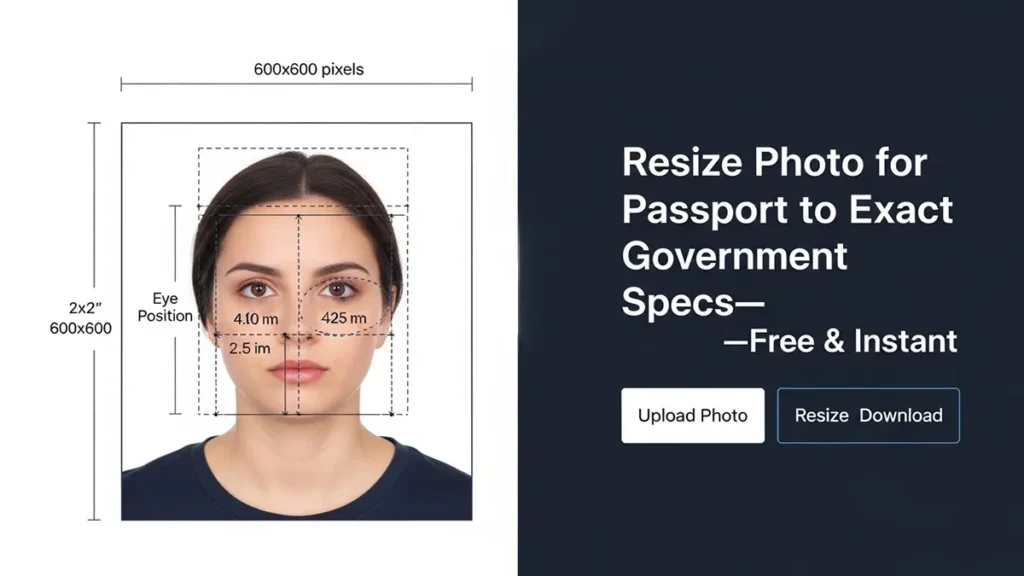
Step 1: Upload Your Photo
Drag and drop your image files or click to browse. Our tool accepts JPG, PNG, and WEBP formats. You can upload single or multiple photos for bulk processing.
Step 2: Select Your Format
Choose from our preset library of country-specific dimensions. Select your document type (US 2×2″, UK 35×45mm, visa, or ID card) or enter custom measurements. The tool automatically adjusts with the correct aspect ratio.
Step 3: Download Instantly
Download your converted photos individually or as a ZIP file. No watermarks, no signup required. Files are optimized for both online submission and print at 300 DPI.
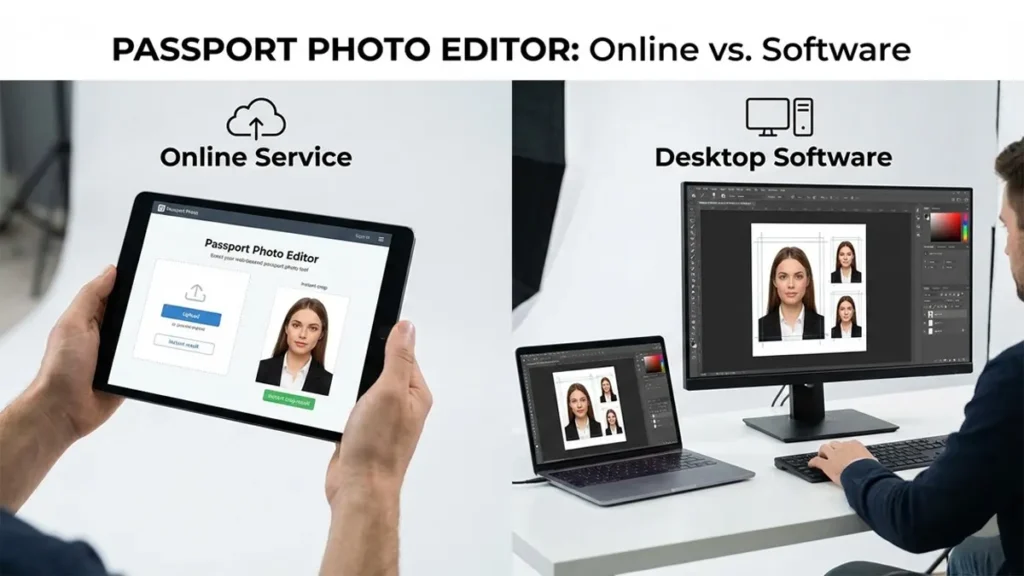
Why Resize Photo for Passport Online vs Desktop Software
When you need to resize photo for passport applications, choosing between online tools and desktop software matters. Online converters offer instant processing without installation, while desktop software requires downloads and setup time.
Our browser-based tool processes images instantly with no software installation. Simply upload, select your preset, and download—all within seconds. Desktop alternatives like Photoshop require technical knowledge and subscription fees.
Online processing also ensures you’re always using the latest dimension standards. Government requirements occasionally change, and our presets update automatically to reflect current specifications.
Passport Photo Size Requirements by Country
Understanding dimension requirements is crucial for application approval. Different countries have specific measurements in inches, millimeters, or pixels.
United States Passport Photo Size
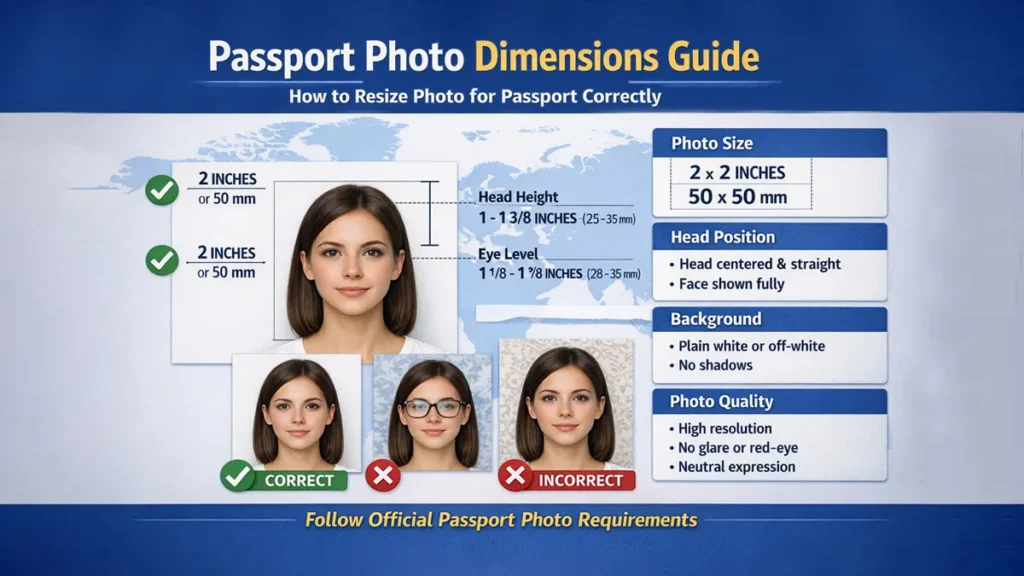
The US passport photo size is 2×2 inches (51×51mm) or 600×600 pixels for digital submissions. Photos must show a full face view with a plain white or off-white background. For complete specifications, refer to the official US passport photo requirements from the Department of State.
The head height must measure between 1 to 1⅜ inches (25-35mm) from chin to top of head.
US Specifications:
- Dimensions: 2×2 inches (600×600 pixels)
- File format: JPEG or PNG
- Resolution: Minimum 300 DPI for print
- Background: White or off-white
- Head position: Centered, facing camera directly
United Kingdom Passport Photo Size
UK passport photo dimensions are 35×45mm (1.38×1.77 inches) or 413×531 pixels. The photo must be printed on high-quality paper with a plain light-colored background. Visit the UK government passport photo guidelines for detailed technical requirements.
UK Specifications:
- Dimensions: 35×45mm (413×531 pixels)
- File format: JPEG
- Resolution: Minimum 600 DPI recommended
- Background: Plain cream or light grey
- Face coverage: 29-34mm from chin to crown
Canada Passport Photo Size
Canadian documents require 35×45mm (413×531 pixels) dimensions, similar to UK standards. The head must measure between 31-36mm from chin to crown.
Canada Specifications:
- Dimensions: 35×45mm (413×531 pixels)
- File format: JPEG
- Resolution: 600 DPI minimum
- Background: Plain white or light-colored
- Recent photo: Taken within last 6 months
India Passport Photo Size
India passport photo dimensions are 35×45mm (413×531 pixels) with specific head measurement requirements. Background must be white with 70-80% face coverage.
India Specifications:
- Dimensions: 35×45mm (413×531 pixels)
- File format: JPEG (max 300KB file size)
- Resolution: 300-600 DPI
- Background: White only
- Face coverage: 70-80% of photo area
EU/Schengen Passport Photo Size
European Union and Schengen countries follow standardized dimensions of 35×45mm (413×531 pixels) with consistent biometric requirements across member states.
EU/Schengen Specifications:
- Dimensions: 35×45mm (413×531 pixels)
- File format: JPEG
- Resolution: 600 DPI
- Background: Light grey or plain
- Head height: 32-36mm from chin to crown
Other Country Requirements
Pakistan: 35×45mm (413×531 pixels) – white background China: 33×48mm (390×567 pixels) – white or light blue background Japan: 35×45mm (413×531 pixels) – plain background, no headwear Australia: 35×45mm (413×531 pixels) – plain light-colored background
Complete Preset Library: All Supported Formats
Our tool includes 25+ pre-configured presets covering passports, visas, ID cards, and other official documents. Simply select your document type and country—the tool handles exact measurements automatically.
Passport Photo Presets
We support official document photos for these countries with government-compliant specifications:
North America:
- US/Canada Passport (2×2″ / 600×600px)
Europe:
- UK Passport (35×45mm / 413×531px)
- EU/Schengen Passport (35×45mm / 413×531px)
Asia:
- India Passport (35×45mm / 413×531px)
- Pakistan Passport (35×45mm / 413×531px)
- China Passport (33×48mm / 390×567px)
- Japan Passport (35×45mm / 413×531px)
Oceania:
- Australia Passport (35×45mm / 413×531px)
Visa Application Presets
Visa applications often have different specifications than standard documents:
- US Visa Photo (2×2″ / 600×600px)
- Schengen Visa Photo (35×45mm / 413×531px)
- UK Visa Photo (35×45mm / 413×531px)
- Canada Visa Photo (35×45mm / 413×531px)
- China Visa Photo (33×48mm / 390×567px)
ID Card Photo Presets
Identity cards and national ID documents:
- ID Card Pakistan CNIC (35×45mm / 413×531px)
- ID Card US (2×2″ / 600×600px)
- ID Card EU (35×45mm / 413×531px)
- ID Card India (35×45mm / 413×531px)
Driving License Photo Presets
Driver’s license and permit photos:
- Driving License US (2×2″ / 600×600px)
- Driving License UK (35×45mm / 413×531px)
- Driving License India (35×45mm / 413×531px)
Other ID Document Presets
Additional identification documents:
- Student ID Photo (2×2″ / 600×600px)
- Employee Badge Photo (2×2″ / 600×600px)
- Professional License Photo (35×45mm / 413×531px)
Print-Ready Presets
High-resolution formats optimized for professional printing:
- US Passport Print Ready (2×2″ @ 300 DPI / 600×600px)
- EU Passport Print Ready (35×45mm @ 300 DPI / 413×531px)
Passport Photo Dimensions Guide: How to Resize Photo for Passport Correctly
Measurements can be expressed in multiple units. Understanding the conversion helps ensure compliance with government requirements.
Dimensions in Inches
The most common measurement in inches is 2×2″ (United States, Canada for digital submissions) or 1.38×1.77″ (35×45mm equivalent for UK, EU, India).
Dimensions in Millimeters (mm)
European and Asian countries primarily use millimeters:
- Standard: 35×45mm (UK, EU, India, Canada, Pakistan, Japan, Australia)
- China: 33×48mm
- US equivalent: 51×51mm
Dimensions in Pixels
Digital formats for online applications:
- US format: 600×600 pixels (1:1 aspect ratio)
- EU/UK format: 413×531 pixels or 472×590 pixels
- Print-ready: Minimum 600 DPI at physical dimensions
Dimensions in Centimeters (cm)
Some regions reference dimensions in centimeters:
- Standard: 3.5×4.5cm (35×45mm equivalent)
- US format: 5.1×5.1cm (2×2 inches)
Technical Specifications and Quality Standards
Beyond basic measurements, official photos must meet technical quality standards for acceptance.
Resolution and DPI Requirements
Digital images require minimum resolution standards:
- Online submission: 600×600 pixels minimum (US), 413×531 pixels (EU/UK)
- Print resolution: 300 DPI minimum, 600 DPI recommended
- File size: Typically 50KB – 300KB depending on country requirements
File Format Requirements
Accepted formats vary by country:
- JPEG/JPG: Most widely accepted format (US, UK, EU, India)
- PNG: Accepted by some countries for digital submission
- WEBP: Not universally accepted, convert to JPEG before submission
Aspect Ratio Standards
Maintaining correct aspect ratio prevents distortion:
- US documents: 1:1 aspect ratio (square)
- EU/UK documents: Approximately 0.778:1 aspect ratio (35:45)
- Print-ready formats: Must maintain exact ratio to meet head measurement requirements
Color and Background Requirements
Most countries require:
- Background: Plain white, off-white, cream, or light grey
- Color mode: Full color (RGB)
- Lighting: Even, no shadows on face or background
- Expression: Neutral, mouth closed, eyes open
Best Practices to Resize Photo for Passport Submission*
Following best practices ensures acceptance. Always use original high-resolution images (minimum 1200×1200px for US, 1000×1200px for EU). Verify file format requirements before submission—most countries prefer JPEG. Maintain natural colors without filters or heavy editing.
Bulk Processing and Multiple Image Handling
Process multiple images simultaneously with our batch conversion feature. This is ideal for families, organizations, or anyone needing to prepare several documents at once.
How to Resize Photo for Passport in Bulk
Upload multiple images in one operation and apply the same dimensions to all files. Download individually or as a single ZIP file containing all converted images.
Benefits of Batch Conversion
- Save time when processing family applications
- Maintain consistent measurements across all images
- Handle employee ID photos for organizations
- Convert entire folders in one operation
Format Conversion Options
Our tool includes format conversion alongside dimension adjustment.
Convert to JPEG
JPEG is the most universally accepted format. Convert PNG, WEBP, or other formats to JPEG while adjusting dimensions.
Convert to PNG
PNG format preserves quality without compression artifacts. Some countries accept PNG for digital submissions.
WEBP Format Considerations
WEBP files are smaller but not widely accepted for official documents. We recommend converting to JPEG before submission.
Convert to AVIF
AVIF provides superior compression and quality compared to JPEG and WEBP. This modern format reduces file sizes significantly while maintaining image clarity, though acceptance for official documents is still limited.
Format Recommendations for Passport Photos
- Best for submission: JPEG (universally accepted)
- Best for quality: PNG or AVIF (larger files, no compression loss)
- Best for storage: WEBP or AVIF (smaller files)
- Not recommended: WEBP or AVIF for official submissions unless explicitly supported
Common Mistakes to Avoid
Understanding what causes rejection helps ensure acceptance on first submission.
Incorrect Dimensions
Using incorrect dimensions is the most common rejection reason. Always verify country-specific requirements before converting your images.
Poor Image Quality
Low-resolution images (under 300 DPI for print) appear pixelated and get rejected. Our tool ensures proper resolution automatically.
Wrong Aspect Ratio
Stretching or squashing images to fit dimensions distorts facial features. Our tool maintains correct proportions automatically.
Inappropriate Backgrounds
Patterned, colored, or busy backgrounds cause rejection. Ensure plain white, cream, or light grey background before uploading.
Outdated Photos
Most countries require photos taken within the last 6 months. Check your country’s recency requirements.
Frequently Asked Questions (FAQ)
What is the standard passport photo size?
US documents are 2×2 inches (600×600 pixels). Most other countries use 35×45mm (413×531 pixels) including UK, EU, Canada, India, and Australia.
Can I resize images on my phone?
Yes, our tool works on mobile devices. Upload images from your phone’s camera or gallery and adjust them to exact specifications.
How do I get 600×600 pixel dimensions?
Upload your image and select “US Passport” or “ID Card US” preset. The converter automatically adjusts to 600×600 pixels.
What is the best format for official documents?
JPEG is the most widely accepted format. Ensure your file is under 300KB for most online submissions.
Can I print photos after using this tool?
Yes, our tool outputs print-ready files at 300 DPI minimum. Ensure your printer doesn’t scale the image during printing.
Do I need special software?
No, our free online tool handles all processing without downloads or installations. It works in any modern web browser.
How many images can I process at once?
You can batch process unlimited images simultaneously. Upload multiple files and download them as a ZIP archive.
Will my photos have watermarks?
No, all processed images are completely watermark-free with no signup required.
Is my data secure?
Yes, all processing happens in your browser. Images are not uploaded to external servers, ensuring complete privacy.
What if my country isn't listed?
Use the “Custom Size” option to enter your country’s specific dimensions manually in pixels, inches, or millimeters.
Why Choose Our Tool
Our platform stands out with comprehensive features designed specifically for official document requirements.
Pre-Loaded Country Presets
Access 25+ country-specific dimension presets including US, UK, Canada, India, Pakistan, China, Japan, Australia, and all EU/Schengen countries. No manual measurement needed.
Comprehensive Document Support
Beyond standard applications, handle visa applications, driver’s licenses, student IDs, employee badges, and professional licenses.
Automatic Aspect Ratio Correction
Our converter maintains correct proportions automatically, preventing facial distortion that causes rejection.
Multiple Output Formats
Download converted files in JPEG, PNG, WEBP, or AVIF formats based on your submission requirements.
Browser-Based Processing
All conversion happens in your browser with no uploads to external servers. Your images remain private and secure.
Mobile-Friendly Interface
Process images on any device—desktop, tablet, or smartphone—with the same functionality.
Unlimited Usage
No daily limits, no premium tiers. Process as many images as you need, whenever you need.
Ready to get started?
Process your images now with our free tool. No signup, no watermarks, unlimited usage.
Other Sizes Besides the Passport Photo Resizer
Finished resizing with our Passport Photo Resizer? If you need a different fixed pixel size for another project, check out these related resize tools below.