
Twitter Profile Picture Resizer - Bulk Resize to 400x400 Instantly
Free Tool to Resize Images for X/Twitter Profile Photos with Auto-Crop
Our Twitter profile picture resizer helps you resize multiple images to 400×400 pixels for X and Twitter instantly. This free Twitter profile picture resizer processes everything in your browser with no signup required. Get perfectly cropped profile photos with instant ZIP download.
- No watermarks
- No Registration
- No Signup
- Universal compatibility
- Instant ZIP Download
- 100% Private: Browser-Only Processing
Welcome to Bulk Image Resizer
Drag & Drop your images here or click to select files
✨ Supports: JPG, PNG, WebP, AVIF, BMP, SVG, GIF, HEIC
All processing happens in your browser. Please keep backup copies of your original files — we are not responsible for any file loss or conversion issues.
Welcome to Bulk Image Resizer
Drag & Drop your images here or click to select files
✨ Supports: JPG, PNG, WebP, AVIF, BMP, SVG, GIF, HEIC
Twitter Profile Picture Size Requirements
Twitter and X require profile pictures to be 400×400 pixels for optimal display. The platform shows your profile photo in a circular frame, so our Twitter profile picture resizer helps you preview how your image will appear.

Key specifications:
- Dimensions: 400×400 pixels (1:1 aspect ratio)
- Maximum file size: 2MB per image
- Supported formats: JPG, PNG, GIF, WebP
- Display format: Circular crop on profile
- Recommended quality: High resolution for clarity
When you upload an image that isn’t exactly 400×400, Twitter applies its own automatic cropping. This often cuts off important parts of your photo or logo. Using our Twitter profile picture resizer before uploading gives you full control over the final appearance.
The 400×400 dimension works across desktop, mobile, and tablet displays. Twitter scales this master size appropriately for different contexts – your large profile view, timeline thumbnails, and reply threads all pull from the same 400×400 source image.
Why 400x400 matters for branding:
Brand consistency depends on precise image dimensions. Our Twitter profile picture resizer maintains logo clarity, prevents unexpected cropping, and ensures your visual identity appears professional. Companies managing multiple Twitter accounts benefit from bulk resizing all profile photos to the exact same specifications.
The square 400×400 format also simplifies design work. Graphic designers can create templates knowing the exact pixel dimensions, and the 1:1 ratio makes it easy to repurpose existing square assets from Instagram or other platforms.
How to Use This Twitter Profile Picture Resizer for 400x400 Images
Drag and drop your images into the Twitter profile picture resizer above. This resizer automatically processes each image to 400×400 pixels – the exact size required for X profile photos.
The bulk processing feature lets you resize multiple images at once. When finished, download all your resized profile pictures as a single ZIP file. No watermarks, no signup, and completely free to use.
Step-by-step guide:
Step 1:Upload / Select your images
Click the upload area or drag files directly from your computer. The Twitter profile picture resizer accepts JPG, PNG, GIF, and WebP formats. Upload single or multiple images for bulk processing.
Step 2: Automatic Conversion
Preview resized images – See instant previews of your images resized to 400×400 pixels. The
Choose your crop mode – Select your preferred resizing method:
- Fill – Scales and crops to fill the entire 400×400 frame
- Fit – Fits the whole image inside 400×400 with padding if needed
- Auto Crop – Smart detection positions key elements optimally
- Manual Crop – Manually select and adjust the crop area to keep exactly what matters most
Convert format if needed – Optionally convert between JPG, PNG, GIF, or WebP formats while resizing to 400×400. Keep your original format or switch to a different one based on your needs.
Process in bulk
Instant Downloads – Single or Bulk
Upload multiple images and the Twitter profile picture resizer handles them all simultaneously.
The Twitter profile picture resizer processes everything in your browser. Your images never upload to any server, ensuring complete privacy with this resizer tool.
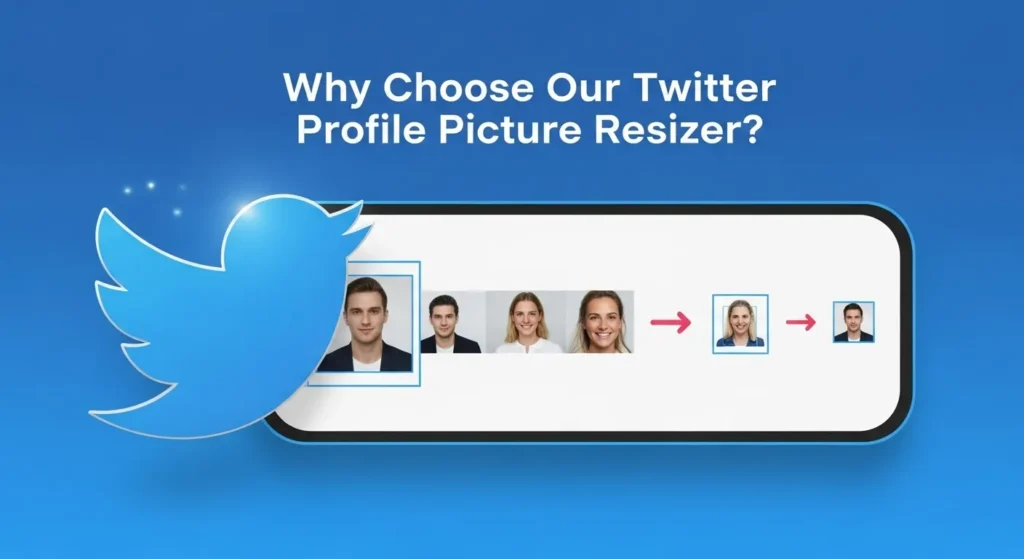
Why Choose Our Twitter Profile Picture Resizer?
100% Private Processing
Our Twitter profile picture resizer processes everything in your browser. Your images never leave your device, making this the most secure resizer for Twitter. This client-side processing approach protects sensitive information, personal photos, and unreleased brand materials.
Traditional online resizers upload your files to remote servers, creating potential security risks. Our browser-based Twitter profile picture resizer eliminates these concerns entirely. Whether you’re working with confidential client assets or personal images, your files remain on your local machine throughout the entire resize process.
Three Intelligent Crop Modes
- Fill: Scales and crops to fill the entire 400×400 frame without distortion. Best for images where you want maximum coverage and don’t mind slight edge trimming.
- Fit: Fits the whole image inside 400×400 with padding if needed. Ideal for logos, text-based images, or photos where you must preserve every element.
- Auto Crop: Smart detection identifies faces, logos, and key subjects, then positions them optimally within the 400×400 frame. Perfect when processing mixed content types in bulk.
The Twitter profile picture resizer offers three modes for different use cases. Headshot photos work well with Fill mode since faces naturally center. Company logos often need Fit mode to prevent cutting off text or design elements. Auto Crop handles varied content types when you’re resizing dozens of different images at once.
Instant Bulk Processing
Resize dozens of images to 400×400 simultaneously. Perfect for managing multiple X accounts, brand profiles, or client work. Download everything as one convenient ZIP file.
Social media managers handling 10, 20, or 50+ accounts save hours with our Twitter profile picture resizer compared to resizing each image individually. Upload an entire folder, and the resizer processes them all at once with a single ZIP download.
Agencies working with multiple clients can batch-process profile pictures for entire campaigns. Event photographers providing headshots to attendees can resize hundreds of images in one session. The bulk capability scales to match your workload.
No Signup or Watermarks
Start resizing immediately with no account required. Your processed images stay clean with zero watermarks or branding. Many free resizer tools add visible watermarks to your photos unless you upgrade to paid plans. This tool never adds watermarks, signup requirements, or usage limits.
The lack of account creation also means no email collection, no password management, and no personal data shared. Visit the page, resize your images, and leave – it’s that simple.
Understanding the Circular Crop
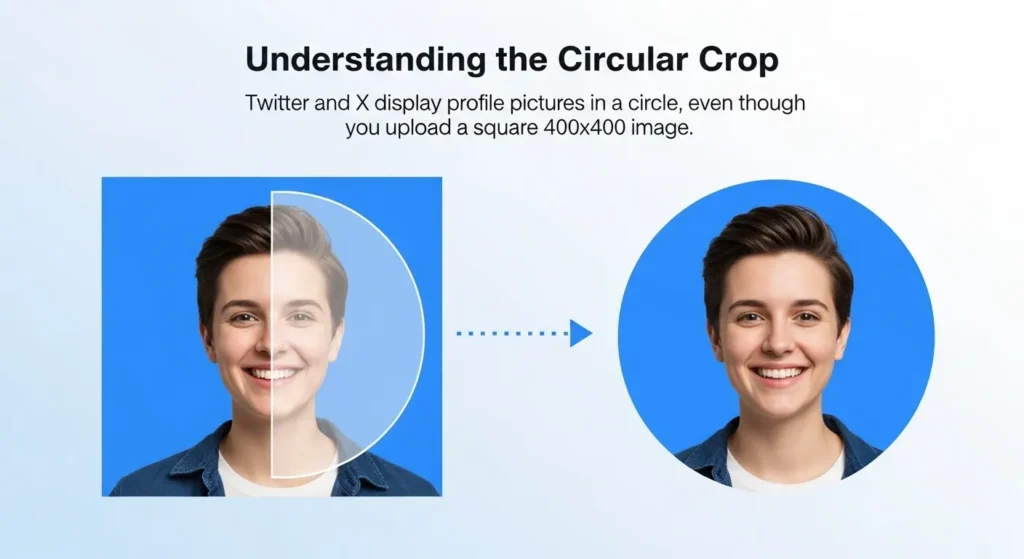
Twitter and X display profile pictures in a circle, even though you upload a square 400×400 image. Important visual elements should stay within the center circle to avoid being cut off. Our Twitter profile picture resizer preview shows exactly how your profile photo will appear after the circular crop is applied.
Faces and logos work best when centered. The Fill mode automatically positions your subject optimally, while Auto Crop uses smart detection to identify key elements.
The science behind circular framing:
Platform designers chose circular profile pictures to create visual consistency across billions of accounts. The round shape also focuses attention on faces and logos while minimizing background distractions.
When you upload a 400×400 square image, X applies a circular mask that hides the corners. Approximately 21.5% of your square image area falls outside the visible circle. Elements placed in the corners will be cropped out entirely.
Each mode serves different use cases. Headshot photos work well with Fill mode since faces naturally center. Company logos often need Fit mode to prevent cutting off text or design elements. Auto Crop handles varied content types when you’re resizing dozens of different images at once.
Design tips for circular display:
Keep critical elements within the “safe zone” – roughly the center 80% of your 400×400 square. This ensures faces, text, and logos remain fully visible after the circular crop.
Test your image using the Twitter profile picture resizer preview before uploading to X. The resizer shows exactly which parts of your photo will be visible and which areas fall outside the circle.
For headshots, position the face centrally with some breathing room around the edges. For logos, consider creating a circular or square design that fits naturally within the round frame. Avoid placing important text near the corners where it will be cropped.
Common circular crop mistakes:
- Placing faces too close to edges, resulting in cut-off ears or hair
- Using landscape-oriented images that waste space in the circular frame
- Adding important text in corners that become invisible
- Forgetting to account for the circular mask when designing branded profile pictures
The Twitter profile picture resizer preview helps you avoid these issues by showing the final circular result before you upload to Twitter or X.
Resize Twitter Header Images
Need to resize your Twitter header too? The recommended size for X/Twitter banner images is 1500×500 pixels. While this tool focuses on profile pictures at 400×400, maintaining proper dimensions across both your profile photo and header creates a cohesive brand presence.
The header (also called banner or cover photo) appears at the top of your profile page. Unlike the circular profile picture, headers display in a wide rectangular format. The 1500×500 dimension provides enough resolution for desktop displays while keeping file sizes manageable.
Coordinating profile pictures and headers:
Successful profiles use complementary profile pictures and headers that work together visually. Consider color coordination, brand consistency, and subject matter when designing both elements.
Some users extend their profile picture design into the header, creating a unified visual story. Others use contrasting elements – a simple logo profile picture paired with a detailed header image showcasing products or team photos.
The 400×400 profile picture overlaps the bottom-left corner of your 1500×500 header on desktop views. Keep this overlap zone in mind when designing headers to avoid placing critical information where it will be covered by your profile photo.
Image Quality and Format Considerations
Supported file formats:
The resizer handles JPG, PNG, GIF, and WebP images. Each format has specific use cases:
- JPG: Best for photographs and images with gradients. Offers smaller file sizes with good quality.
- PNG: Ideal for logos, text, and images requiring transparency. Larger files but lossless quality.
- GIF: Supports animation, though Twitter converts animated GIFs to video. Use for static graphics as well.
- WebP: Modern format with excellent compression. Increasingly popular for web images.
When resizing to 400×400, the tool maintains your original format unless you choose to convert. PNG files remain PNG, JPG stays JPG, and so on.
Quality preservation:
Our Twitter profile picture resizer uses high-quality algorithms to scale images without introducing artifacts or blurriness. Whether you’re upscaling a smaller image or downscaling a large photo, this resizer preserves as much detail as possible. The tool supports all major web image format standards including JPG, PNG, GIF, and WebP to ensure maximum compatibility across different browsers and devices.
For best results, start with source images larger than 400×400. Downscaling from higher resolution preserves more detail than upscaling from lower resolution. If your original photo is 800×800 or 1200×1200, the resized 400×400 version will look crisp and professional.
File size optimization:
Twitter’s 2MB limit per profile picture rarely poses problems with 400×400 images. Even high-quality JPGs at this dimension typically stay under 500KB. PNG logos usually remain under 200KB at 400×400.
If your resized image exceeds 2MB (uncommon but possible with complex PNGs), consider converting to JPG or reducing quality slightly. The visual difference is negligible at 400×400 dimensions, but file size can drop dramatically.
Bulk Processing for Different Use Cases
Social media agencies:
Managing dozens of client accounts across Twitter and X requires efficient workflows. Our Twitter profile picture resizer lets you process an entire client roster’s profile pictures in one session with bulk resizing. Upload all logos, resize to 400×400 simultaneously, and distribute the finished files to each account manager.
This approach saves hours compared to individual processing. It also ensures consistency – every client gets the exact same treatment, every image hits exactly 400×400, and quality remains uniform across your entire portfolio.
Event photography:
Conferences, corporate events, and meetups often provide attendee headshots for social media. Photographers can use our Twitter profile picture resizer to bulk resize hundreds of photos to 400×400, making it easy for attendees to update their Twitter profiles.
Package all resized images in the ZIP download, then share via cloud storage. Attendees download the ZIP, find their photo, and upload directly to Twitter – all sized perfectly at 400×400.
Brand consistency teams:
Companies with multiple departments, regional offices, or franchise locations maintain brand consistency by standardizing all profile pictures to exact specifications. Upload your approved set of branded profile images, resize them all to 400×400, and distribute to every branch or team member.
This eliminates the common problem of inconsistent profile picture sizes across company accounts. Every location, every employee account, and every brand presence maintains identical 400×400 dimensions.
Personal use:
Individuals managing multiple personal accounts (professional, personal, hobby accounts) can resize all their profile pictures at once. Upload photos for each account, process them together, and update all profiles in one efficient batch.
This eliminates the common problem of inconsistent profile picture sizes across company accounts. Every location, every employee account, and every brand presence maintains identical 400×400 dimensions.
Technical Details and Browser Compatibility
How browser-based processing works:
Modern web browsers include powerful image processing capabilities through JavaScript and HTML5 Canvas APIs. Our Twitter profile picture resizer leverages these built-in features to handle all image manipulation locally on your device.
When you drop an image into the tool, JavaScript reads the file, creates a 400×400 canvas, draws your image scaled to fit, and generates the output file – all without any network activity. Your browser does the work, not our servers.
Browser requirements:
The resizer works in all modern browsers:
- Chrome 90+
- Firefox 88+
- Safari 14+
- Edge 90+
Older browsers may lack some features, but the core resize functionality works across any browser from the past 3-4 years. No plugins or extensions required.
Performance and speed:
The Twitter profile picture resizer processes single images instantly. Bulk operations involving dozens of files complete in seconds with the resizer. A typical batch of 20-30 images resizes in under 10 seconds on modern hardware.
Large source files (10MB+ high-resolution photos) take longer to process than smaller files, but the resizer handles them efficiently. Memory management ensures even large batches don’t crash your browser or slow your system.
Frequently Asked Questions (FAQ)
How does the Twitter profile picture resizer work?
Our Twitter profile picture resizer uses browser-based processing to resize images to 400×400 pixels without uploading them to any server. Simply drag and drop your images, choose a crop mode, and the resizer processes everything locally on your device. Download your resized images instantly as individual files or in a bulk ZIP.
What size should a Twitter profile picture be?
Twitter profile pictures should be 400×400 pixels. This square dimension gets displayed in a circular frame across the platform. Uploading images at exactly 400×400 ensures the best quality and prevents unwanted cropping.
The 400×400 standard applies globally across all Twitter and X accounts. Personal profiles, business accounts, verified users, and unverified accounts all use the same dimension requirement.
Can I resize multiple images at once?
Yes, our Twitter profile picture resizer processes multiple files simultaneously. Simply drag and drop all your images, and the resizer will resize each one to 400×400 pixels. 400×400 pixels. Download everything together as a ZIP file.
There’s no hard limit on bulk uploads – process 5, 50, or 500 images in one session. Practical limits depend on your browser’s memory, but most users easily handle batches of 100+ images without issues.
Do you compress or reduce image quality?
Yes, our bulk image resizer processes multiple files simultaneously. Simply drag and drop all your images, and the tool will resize each one to 400×400 pixels. Download everything together as a ZIP file.
There’s no hard limit on bulk uploads – process 5, 50, or 500 images in one session. Practical limits depend on your browser’s memory, but most users easily handle batches of 100+ images without issues.
Is this resizer free to use?
Our Twitter profile picture resizer is completely free with no hidden costs, signup requirements, or watermarks. Resize as many images to 400×400 as you need.
No credit card required, no trial periods that expire, and no premium features locked behind paywalls. Every feature you see is available immediately at no cost.
Does this work for X (Twitter) profiles?
Yes, X and Twitter use the same 400×400 pixel requirement for profile pictures. Our Twitter profile picture resizer works for both platforms regardless of branding.
The Twitter-to-X rebrand didn’t change technical specifications. Images sized for Twitter work perfectly on X, and vice versa. The 400×400 dimension is platform-agnostic.
Why does Twitter crop profile pictures in a circle?
Twitter displays all profile photos in circular frames for visual consistency. Even though you upload a square 400×400 image, only the center circular area shows on your profile. Our tool helps you preview this circular crop before uploading.
The circular design creates uniformity across billions of varied profile pictures. It also focuses attention on faces and logos while de-emphasizing busy backgrounds.
What happens if I upload an image that isn't square?
The resizer adapts non-square images to the 400×400 format using your chosen crop mode. Fill mode scales to cover the entire square, potentially cropping edges. Fit mode shows the whole image with padding bars. Auto Crop intelligently selects the most important square section.
Landscape photos get cropped on the sides or scaled down with top/bottom padding. Portrait photos get cropped top/bottom or scaled with side padding. The preview shows exactly how your non-square image will appear in the final 400×400 output.
Can I use this for other social media platforms?
While optimized for Twitter/X, the 400×400 dimension works for many platforms. Instagram profile pictures display at 320×320 but accept larger uploads. LinkedIn prefers 400×400. Many platforms use square profile pictures in the 300-500 pixel range.
The bulk resizer’s value extends beyond Twitter. If you need consistent 400×400 images across multiple platforms, process them all at once.
How do I ensure my logo looks good in the circular frame?
Use the Fit crop mode to see your entire logo, or design logos with circular framing in mind. Keep text and important design elements within the center 80% of the 400×400 square.
Test your logo in the preview before uploading. If corners of your design get cut off, consider modifying the logo to work better with circular display, or add padding in your source file so the essential elements stay within the visible circle.
What's the difference between Fill, Fit, and Auto Crop?
- Fill: Scales your image to cover the entire 400×400 square, cropping edges if needed. No padding, maximum coverage.
- Fit: Scales your image to fit entirely within 400×400, adding padding bars if the image isn’t square. Shows everything, may have blank space.
- Auto Crop: Analyzes your image to detect faces or important subjects, then crops to 400×400 keeping those elements centered. Smart selection.
For headshots, Fill usually works best. For logos with text, Fit preserves everything. For mixed content batches, Auto Crop adapts to each image intelligently.