Crop Image to Square - Free 1:1 Photo Cropper for Social Media
Crop Images to 1:1 Square Format for Instagram & Social Media
- No watermarks
- No Registration
- No Signup
- Universal compatibility
- Instant ZIP Download
- 100% Private: Browser-Only Processing
Welcome to Bulk Image Cropper
Drag & Drop your images here or click to select files
✨ Supports: JPG, PNG, WebP, AVIF, BMP, SVG, GIF, HEIC
Crop Image
How to Crop Image to Square in 3 Simple Steps
Step 1:Upload
Select images from your device to crop 1:1 format. Supports JPG, PNG, WebP, AVIF, HEIC, SVG, BMP, GIF. No file size limits or quantity restrictions.
Step 2: Auto-Crop
Images automatically crop to 1:1 ratio with smart center-focused positioning. Preview or adjust each crop image 1:1 result before downloading.
Instant Downloads – Single or Bulk
Download all cropped images as individual files or in a convenient ZIP archive. Original quality maintained throughout the process.
Why Crop to 1:1 Square Format?
When you crop image to square (1:1 ratio), your visuals meet universal platform specifications for optimal display across Instagram, Facebook, Twitter, and LinkedIn. Square format ensures professional presentation on all social media.
Key Benefits of 1:1 Crop Format:
Universal Platform Compatibility
Square photos (1:1 aspect ratio) display perfectly across all platforms. When you crop image 1:1, Instagram, Facebook, Twitter, and LinkedIn show your full photo without unexpected cropping or distortion.
Professional Appearance
Square compositions create balanced, centered images that naturally draw attention. They look intentionally designed and professionally curated, perfect for personal brands and businesses.
Perfect for Grid Layouts
Square images create cohesive layouts in Instagram feeds, product catalogs, and portfolio websites. They maintain consistency and enhance your visual brand identity.

When to Crop Image to Square - Best Use Cases
Social Media Posts
Instagram posts look best at 1080×1080 pixels. Crop 1:1 format ensures photos display properly in feeds without automatic cropping cutting off important parts.
Profile Pictures
Product Photography
E-commerce sites like Shopify, Etsy, and Amazon prefer square product images for consistent catalog displays. This format works across all device sizes.
Brand Assets
Logos, app icons, and brand marks work best as squares. They display uniformly across all applications and platforms.
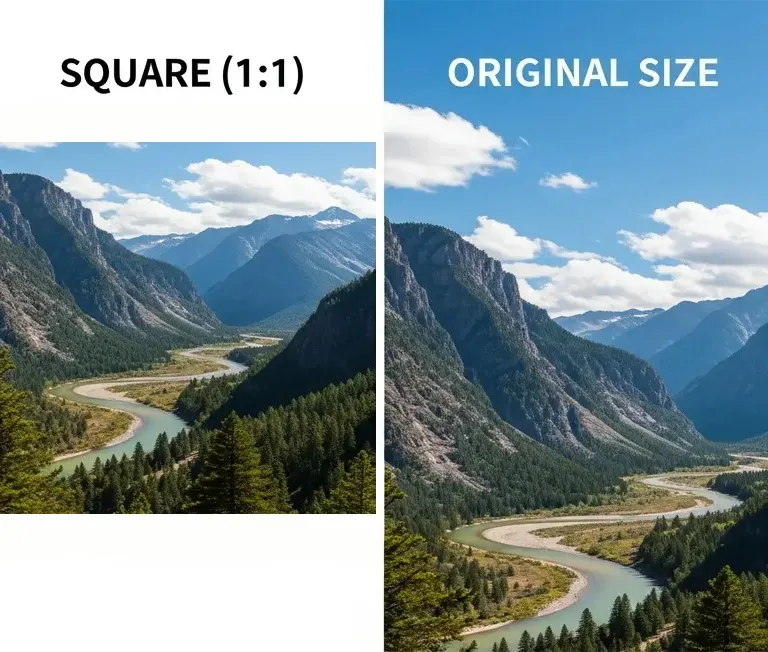
Square (1:1) vs Original: When to Crop to 1:1 Format
Original Image (Uncropped)
- Maintains original composition and framing
- Large file sizes (often 1MB – 10MB+)
- May not fit platform requirements
- Inconsistent display across platforms
- Slower upload and loading times
- Risk of unwanted automatic cropping
Use original when: Professional photography portfolios, landscape photography, wide-format prints, or when maintaining full scene context is essential
After You Crop Image 1:1 - Square Benefits
- Optimized for all social media platforms
- 1:1 (Square) aspect ratio maintained
- Faster upload and loading times
- Images get cropped unexpectedly → Perfect fit with no cropping
- Inconsistent sizing across platforms → Universal compatibility
- Awkward compositions → Centered, balanced framing
Crop to 1:1 square when: Instagram posts, Facebook profiles, product photography, social media marketing, brand logos, or multi-platform content
Common 1:1 Square Sizes - Perfect Crop Dimensions
Social Media
- Instagram Posts: 1080x1080px (recommended)
- Facebook Profile: Upload 720x720px for quality (displays at 180x180px)
- Twitter/LinkedIn: 400x400px
Professional Use
- Standard quality: 1000x1000px
- High quality: 2000x2000px
- Print/Professional: 3000x3000px or larger
Our tool maintains image quality at any resolution.
Ready to create the perfect size?
Automatically maintains quality at any resolution
How to Crop Photos to Perfect 1:1 Square
Add Your Heading Text Here
- Upload: Click “Choose File” or drag your photo into the tool
- Position: Drag image to frame your subject for perfect 1:1 crop
- Adjust: Zoom in or out to capture exactly what you want
- Download: Click the button and save your square photo
Pro Tips
- Center important elements: Keep faces and key details centered when you crop image 1:1
- Check all sides: Make sure nothing important gets cut off at the edges
- Preview on mobile: Square images can look different on phone screens
- Start with quality: Use high-resolution source images for best results
✓ 100% Free ✓ No Watermarks ✓ Works Offline ✓ Unlimited Use
Batch Crop Multiple Images to 1:1 Square
Need to crop image to square for multiple files? Upload simultaneously and process all at once. Perfect for:
- Preparing an Instagram feed
- Creating product catalog images
- Batch processing profile pictures
- Preparing portfolio photos
Download each image individually or get them all in one convenient ZIP file. All photos maintain their original quality.
Upload up to 50 photos at once • Download as ZIP
Frequently Asked Questions (FAQ)
Create Professional Square Photos in Seconds
Join thousands using our free cropping tool daily. No sign up, no watermarks, no limits.
What does 1:1 aspect ratio mean?
Understanding aspect ratios: It means width equals height, creating a perfect square. For example, 1000×1000 pixels or 2000×2000 pixels. All sides have the same length.
What's the best size when I crop image to square for Instagram?
Instagram recommends 1080×1080 pixels for square posts. The platform automatically optimizes images, but starting at this size ensures best quality.
Can I crop multiple images to 1:1 at once?
Yes, upload as many files as you need. The tool processes them all simultaneously and lets you download individually or as a ZIP archive.
Does cropping reduce quality?
No. Cropping only changes dimensions, not compression. The visible portion maintains the same quality as your original file.
Is it free to crop image to square?
Yes, completely free with unlimited use. No watermarks, no registration, no hidden costs.
Does it work offline?
Yes! This tool runs entirely in your browser. Your images never leave your device, ensuring privacy and security.