
Free Instagram Post Resizer - Bulk Resize to 1080×1080

Resize Multiple Images for Instagram Feed Posts Instantly

Resize images for Instagram to exactly 1080×1080 pixels with our free bulk tool. No watermarks, no signup required. Upload multiple photos, choose fill/fit/crop modes, convert formats, and download as ZIP—all processed securely in your browser.

All processing happens in your browser. Please keep backup copies of your original files — we are not responsible for any file loss or conversion issues.
Why Resize Images to 1080×1080 for Instagram Posts

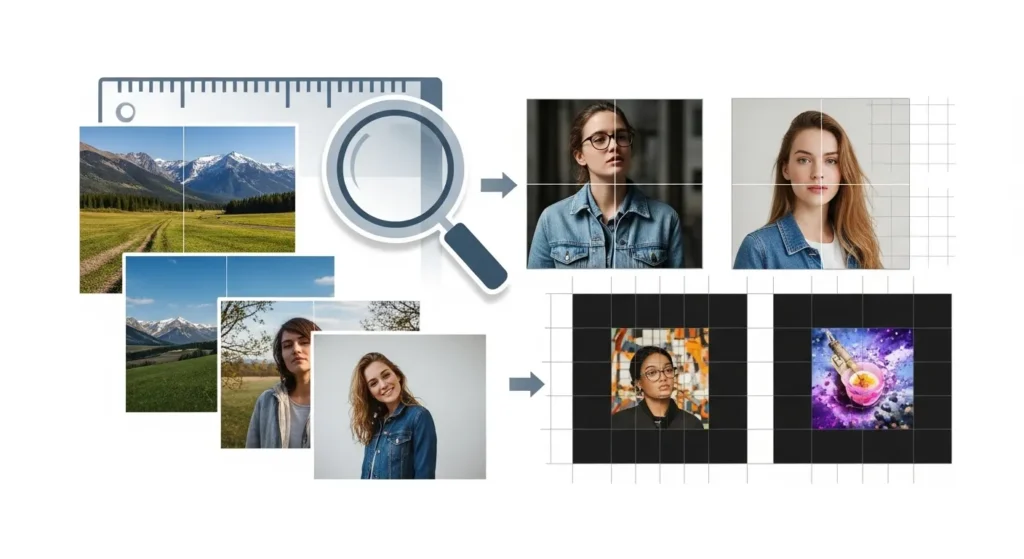
Instagram post resizer guide showing multiple images resized to 1080x1080 square format for grid layout optimization

Instagram displays feed posts at 1080×1080 pixels for square images, making this the optimal Instagram post size for maximum visual impact. Using our instagram post resizer ensures your photos appear sharp and professional in the grid layout without unexpected cropping or quality loss.

When you resize photos for Instagram to this dimension with our instagram post resizer, your content maintains its quality and fits perfectly in users’ feeds. Our instagram post resizer gives you complete control over the final appearance. Instagram’s platform automatically processes images, but starting with 1080×1080 gives you complete control over the final appearance. This prevents Instagram from applying its own compression or cropping that might affect your carefully composed shots.

The 1080×1080 format is particularly important for businesses, influencers, and content creators who want their Instagram grid layout to look cohesive and professional. When all your posts use consistent dimensions, your profile creates a harmonious visual experience that encourages followers to explore more content.

Square photos for Instagram also display consistently across different devices. Whether viewers browse on mobile phones, tablets, or desktop computers, the 1:1 aspect ratio ensures your images look identical everywhere.

Complete Instagram Post Size Guide for 2026

Understanding Instagram image dimensions helps you optimize every post type and create content that looks professional across your entire profile.

Instagram Feed Posts:

Square posts at 1080×1080 pixels (1:1 aspect ratio) remain the most popular format. This Instagram post size works perfectly for the grid view and ensures consistent spacing. Our instagram post resizer specializes in the 1080×1080 format, making it easy to prepare multiple images quickly with our free instagram post resizer.

Portrait posts at 1080×1350 pixels (4:5 aspect ratio) allow more vertical space in the feed. This format works well for showcasing products, full-body photos, or content where height matters. While our tool focuses on square posts, you can use the fit mode to prepare portrait images with appropriate borders.

Landscape posts at 1080×566 pixels (1.91:1 aspect ratio) display wider than they are tall. This format suits panoramic shots, group photos, or wide scenic images. However, landscape posts take up less space in the feed compared to square or portrait formats.

Other Instagram Formats:

Stories use 1080×1920 pixels with a 9:16 aspect ratio. This vertical format fills the entire mobile screen. Use our Instagram Story Resizer for this format, which also works perfectly for Reels since they share the same dimensions.

Reels also use 1080×1920 pixels (9:16 aspect ratio). Many creators don’t realize that Reels and Stories have identical dimensions, meaning you can prepare content for both formats simultaneously with our Story Resizer tool.

Profile pictures display at 320×320 pixels (1:1 aspect ratio). While small, your profile picture appears throughout Instagram—on your profile, in comments, and in DMs. Use our Profile Picture Resizer to ensure your profile image looks crisp and clear.

Instagram carousel posts allow multiple images in one post, and each slide can use different dimensions. However, using consistent 1080×1080 sizing across all carousel images creates a smoother viewing experience as users swipe through your content.

Instagram regularly updates their image specifications. For the latest official requirements, check Instagram’s Help Center.

Our 1080×1080 resizer specializes in square Instagram posts, the most popular format for feed content and grid layouts.

Choose Your Resize Mode: Fill, Fit, or Auto Crop

Our instagram post resizer gives you complete control over how your images adapt to the 1080×1080 format. This instagram post resizer offers three professional modes. Understanding each mode helps you choose the right approach for different image types.

Fill Mode:

Our instagram post resizer’s fill mode stretches your image to completely fill the entire 1080×1080 frame. This mode works best when your original image already has a similar aspect ratio to 1:1, minimizing distortion.

Use fill mode when you want the entire frame occupied by your image without any borders or backgrounds. This creates bold, edge-to-edge posts that maximize visual impact in the Instagram feed.

However, be cautious with fill mode if your original image has a very different aspect ratio. A wide landscape photo stretched to square proportions might look unnaturally distorted. Always preview the result before downloading.

Fit Mode:

Our instagram post resizer’s fit mode is the ultimate no crop Instagram solution. This mode maintains your original aspect ratio perfectly and adds borders (white, black, or custom color) to reach the 1080×1080 dimensions.

This approach is ideal when preserving your entire photo matters more than filling the frame. Portrait photos, tall product shots, or wide panoramas all work beautifully with fit mode because nothing gets cut off or distorted.

Fit mode is especially popular among photographers and artists who want to display their complete work without any cropping. The added borders create a frame effect that can actually enhance certain types of images, giving them a gallery-style presentation.

You can choose border colors that complement your image or match your brand aesthetic. Some creators use consistent border styles across all their posts to create a signature look in their Instagram grid layout.

Auto Crop Mode:

Our instagram post resizer’s auto crop mode intelligently crops your image to fit 1080×1080 while keeping the central focus area intact. This instagram post resizer feature saves enormous time. Our algorithm analyzes your image and determines the best cropping position automatically.

This mode saves enormous time when you need to batch resize Instagram posts. Instead of manually cropping each image, auto crop handles everything in seconds. It’s perfect for bulk processing large photo collections.

Auto crop works best with images where the main subject is centered or slightly off-center. The algorithm prioritizes keeping faces and obvious focal points in frame while removing peripheral content.

For content creators managing multiple accounts or posting frequently, auto crop combined with bulk upload capabilities transforms what used to be a tedious process into a quick task.

Need More Control?

Sometimes you want to manually decide exactly which portion of your image to keep. In those cases, use our Instagram Post Cropper tool first to select your desired area, then resize the cropped result to 1080×1080.

This two-step workflow—crop then resize—gives you maximum creative control while ensuring perfect dimensions for Instagram. Many professional social media managers use this approach for their most important posts.

Convert Image Formats While You Resize

Our tool isn’t just an Instagram post resizer—it’s also a powerful image format converter. Using our instagram post resizer with format conversion capabilities means you don’t need multiple tools. This instagram post resizer handles both dimension changes and format optimization simultaneously. Resize and convert images in one streamlined process, saving time and ensuring optimal file formats for Instagram.


WebP Format:

Convert to WebP for the best balance of quality and file size. WebP is a modern image format developed by Google that offers superior compression compared to traditional JPG or PNG files.

When you convert to WebP using our instagram post resizer, your images can be 25-35% smaller in file size while maintaining the same visual quality. This means faster uploads to Instagram, less mobile data usage, and quicker loading times when followers view your posts.

Instagram accepts WebP uploads, and using this format can actually improve your posting workflow. Smaller files upload faster, especially important when you’re bulk uploading multiple posts or working with slower internet connections.

WebP also supports both lossy and lossless compression, giving you flexibility. For photographs with lots of color gradients, lossy WebP works perfectly. For graphics or images with text, lossless WebP maintains absolute clarity.

PNG Format:

PNG excels at preserving sharp edges and maintaining transparency. If your images include text overlays, logos, or graphics with hard edges, PNG format prevents the compression artifacts that JPG sometimes creates.

PNG uses lossless compression, meaning no quality is lost during the resize and convert process. What you see is exactly what gets saved. This makes PNG ideal for images where precision matters—product photos with fine details, screenshots, or any image containing text.

However, PNG files are typically larger than JPG or WebP. Use PNG when quality is the priority and file size is less of a concern. For most Instagram posts, the quality difference is worth the slightly longer upload time.

PNG also supports transparency, though Instagram’s feed doesn’t display transparent backgrounds (it converts them to white). Still, having PNG files in your asset library is useful if you later repurpose content for other platforms or designs.

JPG Format:

JPG remains the most universally compatible image format and Instagram’s native format. When you upload images to Instagram, they’re typically converted to JPG anyway, so starting with JPG ensures you control the compression quality.

Our image format converter lets you resize to 1080×1080 and save as JPG with optimal compression settings. This gives you smaller file sizes than PNG while maintaining excellent visual quality for photographs.

JPG works best for photos with smooth color transitions—portraits, landscapes, food photography, and lifestyle content. The format’s lossy compression is nearly invisible to the human eye at high quality settings, making it the standard choice for most Instagram posts.

Use JPG when you need broad compatibility and reasonable file sizes. It’s the safe, reliable choice that works everywhere.

AVIF Format:

AVIF is the newest format option, offering even better compression than WebP. Convert to AVIF when you want the absolute smallest file sizes while maintaining high quality.

AVIF can achieve 50% smaller file sizes compared to JPG at equivalent quality levels. This next-generation format is gaining support across modern browsers and platforms, including Instagram.

The main advantage of AVIF is efficiency. If you’re managing large content libraries or posting frequently, AVIF files save storage space and bandwidth. For users on limited data plans, AVIF images load quickly without sacrificing visual appeal.

However, AVIF is newer, so some older devices or software might not support it. For maximum compatibility, stick with WebP or JPG. For cutting-edge efficiency, AVIF is the future.

Format Selection Tips:

Choose your format based on your content type and priorities. Photographs generally work best as WebP or JPG. Graphics, screenshots, or images with text benefit from PNG. If file size is critical and you’re confident in platform support, try AVIF.

Our tool makes format conversion effortless. Select your preferred format, resize your images, and download. You can even process the same image in multiple formats to compare file sizes and choose the best option.

How to Bulk Resize Images for Instagram

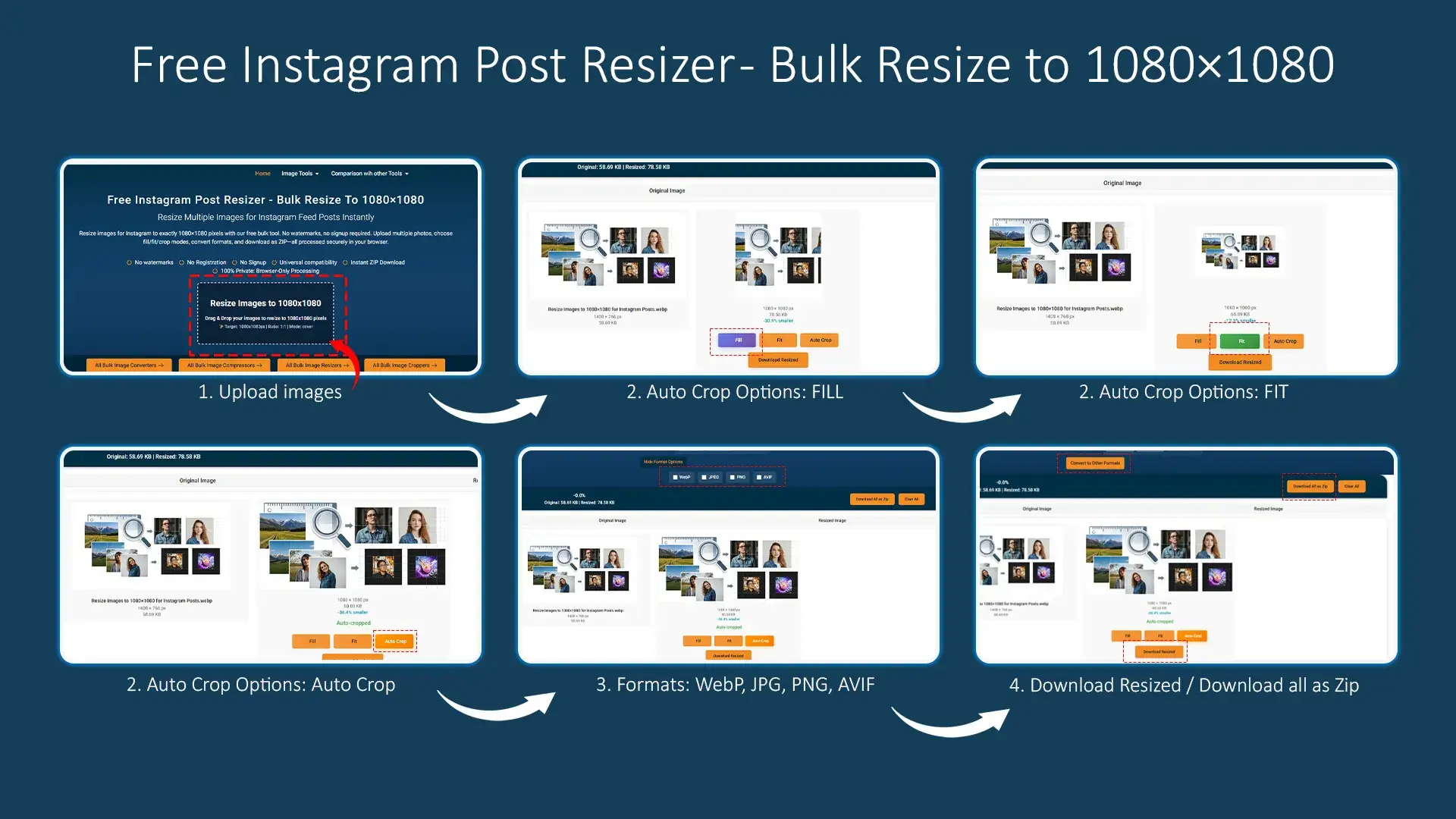
Batch resize multiple Instagram posts in seconds with our instagram post resizer’s streamlined workflow. Our free instagram post resizer handles unlimited files.

Step 1:

Our instagram post resizer accepts unlimited uploads—no restrictions on how many photos you can resize at once with this bulk instagram post resizer.

Step 2:

Before resizing with our instagram post resizer, preview how each image will look at 1080×1080 dimensions.

Step 3:

Choose your output format (WebP, PNG, JPG, or AVIF) if you want to convert while resizing.

Step 4

Click the resize button and watch as your instagram post resizer processes all images. This instagram post resizer delivers instant results.

This batch image resizer saves time when you need to resize photos for Instagram in bulk—ideal for content creators, social media managers, and businesses.

When to Resize vs Crop Instagram Posts

Understanding the difference between resizing and cropping helps you choose the right instagram post resizer tool for each situation.
While related, these operations serve different purposes in preparing images for Instagram.

What Resizing Does:

Resizing changes the dimensions of your entire image to fit the target 1080×1080 size. The resize operation scales your image up or down, adjusts aspect ratios, or adds borders to reach the final dimensions.

When you resize image for Instagram, you’re asking: “How do I make this fit the required dimensions?” The answer might involve stretching (fill mode), adding space (fit mode), or smart cropping (auto crop mode), but the goal is reaching 1080×1080.

Resizing maintains as much of your original image as possible based on your selected mode. With fit mode, resizing preserves 100% of your image by adding borders. With fill mode, resizing keeps all content but might distort proportions slightly. Even auto crop mode tries to keep the important parts of your image.

What Cropping Does:

Cropping removes portions of your image, selecting a specific area to keep while discarding the rest. When you crop, you’re deciding: “Which part of this image matters most?”

Our Crop Instagram Post tool lets you manually select exactly which portion of your image to keep. Draw a selection box around your subject, and everything outside that box gets removed. This gives you precise control over composition.

Cropping is creative, not just technical. You might crop to improve composition, remove distracting elements, change the focal point, or create a specific mood. It’s about choosing what stays and what goes.

When to Use Resize:

Our instagram post resizer is perfect when you’re working with images close to square proportions. Resizing is perfect when:

  • Your image is already well-composed and nothing needs to be removed
  • You’re working with images close to square proportions
  • You want to preserve context around your subject (fit mode with borders)
  • You’re batch processing many images and need speed
  • You’re okay with the automatic decisions of fill or auto crop modes

Resizing is the faster option for bulk operations. When you have 50 images to prepare and they’re all reasonably composed, batch resize with auto crop mode handles everything in seconds.

When to Use Crop:

Use our Instagram Post Cropper tool when you need precise control over which portion of your image to keep. Cropping is essential when:

  • Your image has unwanted elements at the edges
  • You want to reframe the composition for better impact
  • The subject is off-center and you want them centered in the square format
  • You’re working with wide landscapes or tall portraits where automatic cropping might not choose the best area
  • The image has important details that auto crop might accidentally remove

Cropping gives you creative control. If you’re preparing hero images for important launches, crop manually to ensure perfect composition. For everyday posts where speed matters, resize with auto crop.

Combining Both Tools:

Many professional workflows use both tools together. Start with the crop tool to select your desired area and perfect the composition. Then use the resize tool to ensure the cropped result is exactly 1080×1080 and convert formats if needed.

This two-step approach—crop for composition, resize for dimensions—gives you complete control while maintaining efficiency. You make the creative decisions, and the tools handle the technical execution.

Combining Both Tools:

Don’t forget about our Crop Instagram Story tool for vertical 9:16 content. Just like post cropping, story cropping lets you manually select the area to keep before resizing to the 1080×1920 story dimensions.

Whether you resize or crop depends on your image and goals. Both tools are free, fast, and designed to work together in your Instagram content workflow.

Start with our Instagram image resizer for quick dimension adjustments. Switch to our Crop Instagram Post tool when you need precise control over image composition.

Both tools work together for a complete Instagram photo resizer workflow.

Free Instagram Post Resizer with No Compromises

Our instagram post resizer provides professional features without the typical restrictions, paywalls, or privacy concerns found in other free instagram post resizer tools.

No Watermarks:

Unlike many free instagram post resizer tools, our instagram post resizer never adds watermarks to your resized images. Your Instagram posts stay clean, professional, and branded only with your own content.

Watermarks ruin the aesthetic of your Instagram grid layout. They distract from your content, look unprofessional, and sometimes violate Instagram’s terms of service if they’re overly promotional.

We believe tools should serve users without demanding credit on every output. Resize unlimited images, and every single one downloads completely clean without any watermark, logo, or attribution requirement.

This makes our tool viable for professional use. Agencies, brands, and businesses can use our Instagram image resizer free of charge without worrying about client deliverables being watermarked.

No Signup Required:

Start resizing immediately without creating an account, providing an email, or filling out forms. Open the tool, upload images, and download results—no barriers.

This no-signup approach respects your time and privacy. You don’t receive marketing emails, your address doesn’t enter databases, and you don’t need to remember another password.

The instant-access model also means you can use our tool from any device, any location, without worrying about whether you’re logged in. Visit the page, do your work, and move on.

Browser-Only Processing:

This is perhaps our most important feature: all image processing happens locally in your browser. Your photos never upload to our servers, never travel across the internet, and never exist anywhere except on your own device.

Browser-only processing provides absolute privacy. Your images—whether personal photos, unreleased products, confidential client work, or anything else—remain completely private.

This architecture also makes our tool incredibly fast. There’s no upload time to remote servers, no queue waiting for server-side processing, and no download time bringing results back. Everything happens instantly on your device.

For businesses handling proprietary images, influencers working on unreleased collaborations, or anyone concerned about privacy, browser-based processing eliminates all concerns. Your images are never at risk because they never leave your control.


Unlimited Bulk Processing:

Many free instagram post resizer tools limit how many images you can resize—often just 3-5 files before demanding payment or subscription. Our instagram post resizer has no limits whatsoever. Our tool has no limits whatsoever.

Resize 10 images, 100 images, or 1,000 images. Process your entire photo library if needed. There are no daily limits, no monthly quotas, no premium tiers with higher limits.

This unlimited capacity is essential for professional workflows. Social media managers preparing monthly content calendars, photographers organizing portfolio pieces, or marketers executing campaigns can’t work within artificial file limits.

We provide truly unlimited bulk processing because browser-based architecture means processing capacity scales with your device, not our servers. You’re not competing for server resources, so there’s no reason to limit you.

Instant Results:

Our instagram post resizer processes images in seconds. This instagram post resizer uses browser-based technology for instant results. Modern browsers are remarkably powerful, handling image processing operations that used to require specialized software.

The combination of local processing and efficient algorithms means instant results. Upload, click resize, and watch your images process in real-time. Even large batches complete in seconds.

This speed makes our tool practical for deadline-driven work. When you need to resize images right before posting, waiting isn’t an option. Our tool delivers instantly.

ZIP Download:

Downloading resized images individually for large batches would be tedious. Our ZIP download feature packages everything into one convenient file.

One click downloads your entire batch as a ZIP. Extract the ZIP on your computer, and all your resized Instagram posts are ready to upload. The ZIP maintains your original filenames (with updated extensions if you converted formats), making organization simple.

For single-image jobs, individual downloads work fine. But for bulk operations, ZIP download is the only sensible approach, and we include it automatically for free.

Cross-Platform Compatibility:

Our tool works on any device with a modern browser—Windows, Mac, Linux, iPhone, iPad, Android, Chromebook, or anything else. Browser-based tools are inherently cross-platform.

This universality means you can resize images wherever you work. Start on your desktop computer, continue on your tablet, finish on your phone. No app installations, no platform restrictions, no compatibility concerns.

The responsive design adapts to your screen size, whether you’re on a 27-inch monitor or a phone screen. All features work across all devices.

Optimize Your Instagram Grid Layout

Your Instagram grid is your portfolio, storefront, and first impression all in one. Using our instagram post resizer ensures consistent sizing. Consistent sizing creates a cohesive, professional grid layout that encourages profile visitors to explore your content.

Why Grid Cohesion Matters:

When visitors land on your Instagram profile, they see your grid—a 3-column display of your recent posts. If these posts use inconsistent dimensions, the grid looks chaotic and unprofessional.

Using 1080×1080 for all your feed posts ensures perfect alignment in the grid. Each post occupies the same visual weight, creating balance and harmony. This professional presentation makes your profile look intentional and curated rather than haphazard.

Brands and influencers with cohesive grids tend to attract more followers and engagement. The visual consistency signals professionalism and attention to detail, qualities that build trust with potential followers.

Planning Grid Aesthetics:

Some creators plan their Instagram grid layout several posts in advance, ensuring color schemes, subject matter, and composition flow well across rows and columns.

Using our instagram post resizer makes grid planning practical. This instagram post resizer prepares multiple posts at once. Prepare multiple posts at once, all at perfect 1080×1080 dimensions, and schedule them knowing they’ll align perfectly in your grid.

You might use consistent resize modes (like always using fit mode with white borders) to create a signature grid style. Or alternate between different styles in a pattern for visual interest.

Grid Preview Before Posting:

Before uploading to Instagram, use grid preview tools to see how your new posts will look alongside existing content. This preview helps you catch potential issues like clashing colors or compositional conflicts.

Having all your posts at consistent 1080×1080 dimensions makes grid planning simpler. You know exactly how much space each post will occupy and can arrange content accordingly.

Maintaining Consistency:

Establishing a workflow where you always resize images for Instagram to 1080×1080 before posting maintains long-term grid consistency. Make our tool part of your posting routine—resize first, then upload.

This consistency extends beyond dimensions. Consider using the same resize mode, format, and quality settings for all posts. These subtle consistencies contribute to overall grid cohesion.

Over time, a well-maintained grid becomes a powerful marketing asset. It showcases your brand aesthetic, demonstrates your professionalism, and makes your profile memorable.

Professional Instagram Content Workflows

This professional instagram post resizer handles high-volume workflows efficiently.

Social Media Agencies:

Agencies managing multiple client accounts need efficient tools that scale. Our instagram post resizer handles high-volume operations for professional instagram post resizer workflows —preparing weeks of content for multiple clients in single batches.

The no-watermark feature is essential for client deliverables. Agencies can’t submit watermarked content to clients. Our tool provides professional results suitable for client approval and deployment.

Browser-based processing protects client confidentiality. Sensitive client images never upload to external servers, addressing security concerns that enterprise clients often have.

E-Commerce and Product Photography:

Online stores showcasing products on Instagram need consistent, high-quality imagery. Use our instagram post resizer to resize product photos to 1080×1080 ensuring your catalog looks professional.

Product images often start at high resolutions from professional photography. Bulk resize these large files down to Instagram-optimized sizes while converting to WebP for faster loading.

Consistent square cropping for product photos creates a clean, catalog-style grid that makes your Instagram profile function as a visual product directory.

Influencers and Content Creators:

Influencers posting daily need fast, reliable tools. Our free instagram post resizer workflow—upload, resize, download—takes seconds with this instagram post resizer.

Maintaining aesthetic consistency across hundreds or thousands of posts requires standardized image processing. Always using 1080×1080 and the same resize mode creates visual cohesion across your entire posting history.

MaintainingPhotography Portfolios: Consistency:

Photographers showcasing work on Instagram face a challenge: maintaining artistic integrity while conforming to platform requirements. Our fit mode solves this by preserving entire images with borders rather than cropping.

Batch process portfolio pieces, knowing that the browser-based system won’t compress or alter your images beyond the resizing you specify. What you see in preview is what downloads.

Event Coverage and Real-Time Posting:

When covering events, speed matters. Bulk resize event photos immediately after shooting, then upload to Instagram while the event is still happening.

The instant processing and ZIP download make real-time workflows practical. No waiting for server queues or slow uploads to remote processors—resize and post immediately.

These professional use cases demonstrate why our tool emphasizes speed, privacy, unlimited processing, and no watermarks. Professional work demands professional tools, and we deliver without paywalls or restrictions.

Frequently Asked Questions (FAQ)

Is this Instagram post resizer really free?

Yes, our instagram post resizer is completely free with no hidden costs, subscriptions, or premium tiers. You can resize unlimited images to 1080×1080 without paying anything. There are no watermarks, no signup requirements, and no file limits. Whether you resize 1 image or 1,000 images, it’s always free.

The best Instagram post size is 1080×1080 pixels (1:1 aspect ratio) for square posts. Instagram also supports portrait posts at 1080×1350 (4:5 ratio) and landscape posts at 1080×566 (1.91:1 ratio). However, square 1080×1080 remains the most popular format because it displays consistently in the grid layout and works well across all devices

Absolutely! Our instagram post resizer supports unlimited bulk processing. You can upload and resize dozens or even hundreds of images simultaneously. All resized images download together in a convenient ZIP file. This bulk resize feature is perfect for content creators, social media managers, and businesses preparing multiple Instagram posts.

Our instagram post resizer maintains excellent image quality during the resize process. You can choose from multiple output formats (WebP, PNG, JPG, AVIF), each optimized for quality. PNG offers lossless quality, while WebP and AVIF provide superior compression without visible quality loss. The preview feature lets you check quality before downloading.

No, never. Our instagram post resizer produces completely clean images without any watermarks, logos, or branding. Your resized Instagram posts remain 100% yours with no attribution marks. This makes our tool suitable for professional use, client work, and business applications where watermarks are unacceptable.

Yes, completely safe. Our instagram post resizer processes all images locally in your browser. Your photos never upload to our servers, never travel across the internet, and never exist anywhere except on your device. This browser-only processing ensures absolute privacy and security for your images. Your photos remain under your complete control.

Our instagram post resizer offers three resize modes:

  • Fill mode stretches your image to fill the entire 1080×1080 frame completely
  • Fit mode maintains your aspect ratio and adds borders to reach 1080×1080 (no cropping)
  • Auto Crop mode intelligently crops your image to fit 1080×1080, keeping the central focus

Choose based on your image type and preferences. Preview each mode before downloading to see which works best.

Our instagram post resizer accepts all common image formats as input: JPG, JPEG, PNG, WebP, and AVIF. Upload images in any of these formats, and you can convert them to any other supported format during the resize process. This flexibility ensures compatibility regardless of your source image format.

Yes! Our instagram post resizer includes built-in format conversion. Resize and convert images to WebP, PNG, JPG, or AVIF in one step. Convert to WebP for smaller file sizes, PNG for maximum quality, JPG for compatibility, or AVIF for next-generation compression. This dual functionality saves time by handling both operations simultaneously.

No signup required. Our instagram post resizer works immediately without any account creation, email registration, or personal information. Simply visit the page, upload your images, and start resizing. No passwords to remember, no verification emails, no user profiles. Just instant access whenever you need it.

Yes, our instagram post resizer works perfectly on all devices including smartphones, tablets, laptops, and desktop computers. The browser-based design is fully responsive and adapts to your screen size. You can resize Instagram posts on iPhone, Android, iPad, or any device with a modern web browser.

Unlimited! Our instagram post resizer has no restrictions on batch size. Unlike other free tools that limit you to 3-5 images, you can upload and resize as many images as you need in a single batch. Process 10, 50, 100, or more images simultaneously—there are no limits, quotas, or caps on bulk processing.

This tool specializes in Instagram post resizing (1080×1080). For Instagram Stories and Reels, which use 1080×1920 dimensions (9:16 aspect ratio), use our dedicated Instagram Story Resizer. We also offer specialized tools for Profile Pictures and Story Cropping. Each tool is optimized for its specific Instagram format.

It depends on your image and goals. Use our instagram post resizer when you want to keep your entire image and fit it to 1080×1080 dimensions. Use our Crop Tool when you need to select a specific portion of your image and remove unwanted areas. Many users crop first for composition, then resize for final dimensions. Both tools work together in a complete workflow.