
Bulk SVG to WebP Converter — Free, Fast & Online
No Signup. No Watermark. Just Clean WebP Files.
Convert multiple SVG files to WebP format in seconds.
Upload your files, and the tool handles everything automatically.
Download each file individually or grab them all as a single ZIP.
- Bulk convert — upload multiple SVGs at once
- Auto-converts instantly — no manual steps
- No signup, no watermark, completely free
- Download individually or as a ZIP file
Welcome to Bulk Image Converter
Drag & Drop your images here or click to select files
✨ Supports: JPG, PNG, WebP, AVIF, BMP, SVG, GIF, HEIC
How to Convert SVG to WebP Online (3 Simple Steps)
Converting SVG files to WebP has never been easier. This free SVG to WebP converter requires zero technical knowledge — just upload, convert, and download.
Step 1 — Upload Your SVG Files
Click the upload area or drag and drop your SVG files directly into the tool. You can add multiple files at once for bulk conversion. There is no file limit, so whether you have 2 files or 200, the tool handles them all in one go.
Step 2 — Auto-Conversion Starts Instantly
As soon as your files are uploaded, the tool automatically begins to convert SVG to WebP. No settings to adjust, no buttons to click, no waiting around. The conversion runs in your browser — fast and private.
Step 3 — Download Your WebP Files
Get files individually or as ZIP
Once conversion is complete, download each WebP file individually by clicking its download button. Or use the “Download All as ZIP” option to grab every converted file in a single archive. No signup needed. No watermark added. Just clean WebP files ready to use.
What Is a WebP File and Why Convert SVG to WebP?
WebP is a modern image format developed by Google in 2010. Learn more from Google’s official WebP documentation to understand how it was built for the modern web. It was designed specifically for the web — delivering smaller file sizes compared to formats like PNG or JPEG without sacrificing visual quality.
SVG files are vector-based, meaning they use mathematical paths to render graphics. This makes SVG perfect for logos, icons, and illustrations that need to scale across screen sizes. However, SVG is not always the right format for web delivery — especially when compatibility, file weight, or CMS upload requirements come into play.
That is where converting SVG to WebP makes sense. WebP gives you a compressed, raster version of your graphic that loads faster, works in every modern browser, and is accepted by virtually every platform and content management system.
Key Reasons to Convert SVG to WebP
- Smaller file size — WebP files are significantly lighter, which speeds up your website and improves Core Web Vitals scores
- Broad compatibility — WebP works natively in Chrome, Firefox, Safari, Edge, and Opera
- Raster output — WebP is ideal when you need a fixed-resolution image for web pages, apps, or CMS uploads
- Transparency support — WebP fully supports transparent backgrounds, just like SVG
- Better compression — WebP supports both lossless and lossy compression, giving you control over quality vs file size

SVG vs WebP — What's the Difference?
Understanding the difference between these two formats helps you choose the right one for each use case.
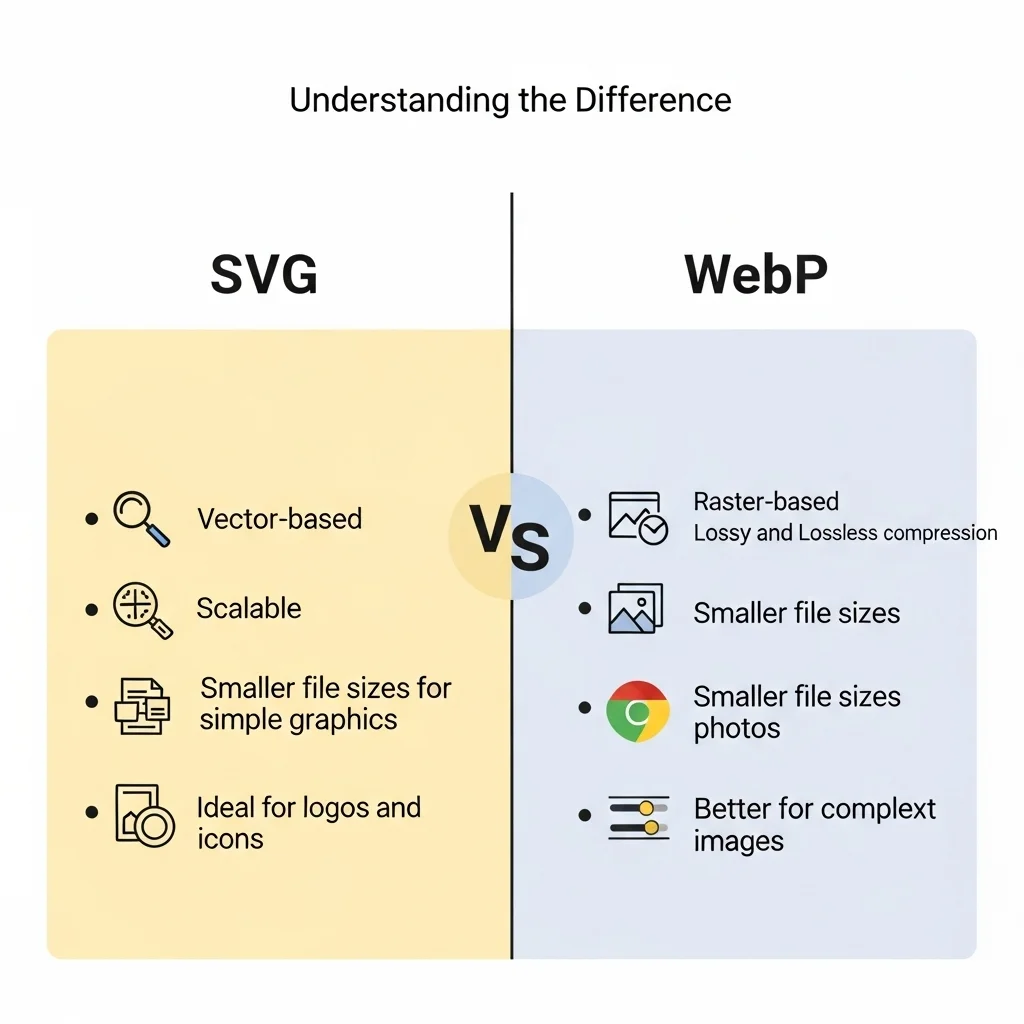
| Feature | SVG | WebP |
|---|---|---|
| File Type | Vector | Raster |
| Scalability | Infinite | Fixed resolution |
| File Size | Varies | Typically smaller |
| Browser Support | Wide | All modern browsers |
| Transparency | Yes | Yes |
| Animation | Yes | Yes (limited) |
| Best For | Icons, logos, illustrations | Web images, thumbnails, UI assets |
| CMS Upload Support | Limited | Universal |
When Should You Use WebP Over SVG?
SVG is the better choice when your graphic needs to scale infinitely — like a responsive logo or a detailed illustration used across multiple screen sizes. It is also better when you need to edit the file as code or animate it with CSS.
WebP wins when you need a compressed, web-optimized image that loads fast and works everywhere. If you are uploading to WordPress, Shopify, Webflow, or any social platform — WebP is the more practical format.
If you are building a performance-focused web page and need lightweight, fast-loading images, converting SVG to WebP online is the smarter choice.
Why Use a Bulk SVG to WebP Converter?
Processing image files one by one wastes time — especially when you are working with large icon sets, design systems, or UI asset libraries.
A batch SVG to WebP converter lets you upload and convert dozens — or even hundreds — of files simultaneously. Our tool processes all conversions in parallel, so you are not waiting for each file to finish before the next one starts. Everything completes at once.
This is particularly useful for developers handing off assets, designers exporting full icon packs, or e-commerce teams updating product image libraries in one session.
Benefits of Batch Conversion
- Upload unlimited SVG files in a single session
- All files convert automatically — no manual steps required
- Download everything as a single ZIP archive with one click
- No file-by-file waiting — all conversions run simultaneously
- Saves hours when working with large design or development asset libraries
Whether you are a web developer, UI designer, or content manager — bulk converting SVG to WebP online cuts your workflow time significantly and removes the friction of repetitive manual exports.
Is This SVG to WebP Converter Free to Use?
Yes — completely free. There are no hidden charges, no premium tiers, and no usage limits.
What You Get for Free
- Unlimited SVG to WebP conversions — no daily cap
- No watermark on any output file, ever
- No account creation or signup required
- No email verification or personal data needed
- Instant download — individually per file or all as a ZIP
- Works entirely in your browser — no software to install
Many online converters add watermarks to free outputs or cap the number of conversions per day. This tool gives you clean, watermark-free WebP files every single time — at absolutely no cost.
Does Converting SVG to WebP Affect Image Quality?
This is one of the most common questions when using any image converter online — and it is a fair one.
WebP supports lossless compression, which means your converted image retains the same visual quality as the original SVG render. The main change is the format itself — from a scalable vector to a fixed-resolution raster image.
Lossless vs Lossy — What Does It Mean?
Lossless compression preserves every pixel of the original image. The file size is reduced by eliminating redundant data, but no visual information is lost. This is ideal for icons, logos, and graphics where sharpness matters.
Lossy compression reduces file size more aggressively by discarding some visual data. The quality difference is often invisible to the human eye at moderate compression levels, but file sizes can be dramatically smaller. This works well for decorative graphics or background images.
Our SVG to WebP converter uses lossless output by default, ensuring your files look sharp and clean every time.
What to Expect After Conversion
- Visual quality — fully preserved with lossless WebP output
- File size — noticeably smaller than equivalent PNG exports
- Transparency — WebP fully supports transparent backgrounds, just like the original SVG
- Resolution — fixed at render time; always use a high-resolution SVG source for the best WebP output
For most web use cases — thumbnails, icons, UI elements, and blog graphics — the output quality from this SVG to WebP converter is production-ready from the moment you download.
Who Is This Tool Built For?
This free SVG to WebP converter online is built for anyone who works with digital images regularly and needs a fast, no-fuss solution.
Common Use Cases
Web Developers — Convert icon libraries and UI assets to WebP for faster page load times, better Lighthouse scores, and improved Core Web Vitals performance. WebP images load faster than SVG in most real-world browser environments.
UI/UX Designers — Export design assets directly from SVG format to WebP for developer handoff, prototyping tools, or CMS uploads. Skip the Photoshop export step entirely.
Content Creators & Bloggers — Quickly convert SVG graphics to a web-friendly WebP format without needing Photoshop, Illustrator, or any paid design software.
SEO Professionals — Reduce image weight across pages by converting SVG to WebP, directly improving site speed, crawl efficiency, and search performance signals.
E-commerce Teams — Convert product icons, badges, and promotional graphics to lightweight WebP files. Faster image loads mean better user experience and higher conversion rates.
Social Media Managers — Many social platforms do not accept SVG uploads. Converting to WebP gives you a universally accepted, compressed alternative that works everywhere.
Frequently Asked Questions (FAQ)
What is the best way to convert SVG to WebP for free?
The fastest way is to use a free online SVG to WebP converter that requires no software installation or signup. Simply upload your SVG files, wait for the auto-conversion, and download your WebP files instantly.
Can I convert multiple SVG files to WebP at once?
Yes. This batch SVG to WebP converter lets you upload and process multiple files simultaneously. When done, download them individually or as a single ZIP archive.
Will my converted WebP files have a watermark?
No. Every file you convert and download is completely watermark-free — regardless of how many files you process.
Does SVG to WebP conversion reduce file size?
Yes. WebP files are typically much smaller than equivalent raster formats like PNG. This makes them ideal for any web use case where page speed and performance matter.
Do I need to create an account to use this tool?
No. There is no signup, login, or account required. Open the tool, upload your files, convert, and download — that is the entire process.
Is WebP supported in all browsers?
Yes. WebP is fully supported in all major modern browsers including Chrome, Firefox, Safari, Edge, and Opera. It has near-universal browser coverage as of 2024.
Does conversion work on mobile devices?
Yes. The tool works directly in your mobile browser. Upload SVG files from your phone or tablet, convert them, and download WebP files without installing any app.
Is my data safe when I upload SVG files?
Yes. All conversions happen directly in your browser. Your files are never stored on any server, and no data is sent or retained after your session ends.