

WebP to JPG Converter - Free Batch Convert WebP to JPG Online
How to Convert WebP to JPG: Free Bulk WebP to JPG Converter - No Signup, No Watermarks
Looking for the best way to convert WebP to JPG? Our professional webp to jpg converter transforms .webp to .jpg format instantly with superior quality. Whether you need to convert image from webp to jpg or batch convert webp to jpg on Windows, Mac, or mobile, our free online tool handles it all. Bulk convert webp to jpg files with unlimited conversions, no registration required, and completely watermark-free results.
- No watermarks
- No Registration
- No Signup
- Universal compatibility
- Instant ZIP Download
- 100% Private: Browser-Only Processing
Welcome to Bulk Image Converter
Drag & Drop your images here or click to select files
✨ Supports: JPG, PNG, WebP, AVIF, BMP, SVG, GIF, HEIC
How to Use Our Bulk WebP to JPG Converter in 3 Simple Steps
Transform WebP to JPEG quickly with this simple guide — perfect for web uploads, social media, and storage optimization. Our free conversion tool works online and supports batch processing, making it easy to handle multiple images at once.
Whether you’re looking for a batch WebP conversion solution for maximum efficiency, this tool ensures your files are universally accepted across websites, apps, and platforms. With optimized WebP JPEG transformation, you’ll get smaller file sizes, faster sharing, and reliable performance.
Whether you need an online WebP conversion tool or just want quick results, this guide will walk you through the process step by step.
STEP 1
Upload Multiple GIF Files
Drag & drop or click Choose File to add your WebP images. You can upload one or multiple files at the same time for bulk conversion using our bulk WebP to JPG converter.
STEP 2
Automatic Processing Begins
Our bulk WebP to JPG converter automatically
processes all files with optimized settings. No configuration needed!
STEP 3
Download Converted JPG Files
Download your converted JPG images right away,
or grab all your files at once in a convenient
ZIP package.
How to Convert WebP to JPG: Complete Guide
Converting .webp files to .jpg format is simple with our online tool. Whether you’re wondering how to convert webp to jpg or need to batch convert webp to jpg windows, follow these methods:
Method 1: Batch Convert WebP to JPG Windows
For Windows users looking to batch convert webp to jpg windows, our online converter works directly in your browser:
- Open your Windows browser (Chrome, Edge, Firefox)
- Upload multiple .webp files simultaneously
- All files are automatically converted to .jpg format
- Download individually or as a ZIP file
Method 2: Convert Image from WebP to JPG on Mac
Mac users can easily convert webp to .jpg using the same browser-based tool:
- Works on Safari, Chrome, and all Mac browsers
- Drag and drop .webp files directly
- Instant conversion without software installation
Method 3: Bulk WebP to JPG Online
Need to bulk webp to jpg convert multiple files? Our webp to jpg batch converter processes hundreds of images:
- Upload up to 100+ .webp images at once
- Automatic batch processing
- Download all as ZIP in seconds
Why Convert WebP Images to JPEG Format?
Converting WebP to JPEG is a practical choice when you need maximum compatibility across websites, apps, and social media platforms. While WebP offers excellent compression and transparency support, it’s not yet universally supported. JPEG remains the most widely accepted format, making it the safer option for sharing and uploads.
Key reasons to convert WebP to JPEG
Universal compatibility
Most websites, social media platforms, and email clients fully support JPG without any processing delays. Upload and share instantly without worrying about format support or conversion requirements.
Optimized file size
Our bulk conversion tool applies intelligent compression when transforming files, ensuring images remain lightweight without major quality loss.
Faster Sharing & Uploading
Most websites, social media platforms, and email clients fully support JPG without any processing delays. Upload and share instantly without worrying about format support.
Better for web & SEO
Smaller JPEG files improve website speed, which helps with search engine rankings and user experience.
Batch conversion benefits
Save storage space by processing multiple WebPs to JPEG and downloading them in one ZIP file using our batch processing tool.
Proven Reliability
JPG has been the web standard for decades. It's the safest choice for client deliverables, public sharing, and situations where you can't control the viewing environment.


Who Benefits from Using Our WebP to JPEG Converter?
Web Developers and Designers
Our bulk webp to jpg converter is essential for developers working with websites that contain numerous WebP graphics. Converting these files ensures better compatibility and faster loading times while maintaining visual quality across all browsers and devices.
E-commerce and Product Photography
Online retailers often use WebP product images for quality and size. Our bulk webp to jpg converter helps maintain consistent image formatting across product catalogs, ensuring fast loading times and universal compatibility across all shopping platforms and mobile devices.
Social Media Content Creators
Content creators working with WebP collections need reliable conversion to JPEG for better social media performance. Our batch processing tool preserves image quality while ensuring posts load quickly across Instagram, Facebook, Twitter, and other platforms.
Why Choose Our WebP to JPG Converter? (Batch Convert WebP to JPG Features
Lightning-Fast & Free Processing
Transform webp tojpg in seconds with our high-speed converter — no software installation, no fees. Our batch convert webp to jpg tool handles multiple files simultaneously for maximum efficiency.
100% Free with No Watermarks - No Signup Required
Convert webp to .jpg completely free of cost. Enjoy unlimited conversions with no hidden charges, restrictions, watermarks, or registration required for our online conversion platform.
>Batch Convert WebP to JPG Windows & Mac Compatible
Whether you need to batch convert webp to jpg windows or Mac, our tool works seamlessly across all operating systems. Upload and bulk convert webp to jpg files from any device or browser.
Advanced Batch Processing for Multiple Images
Upload and convert image from webp to jpg in bulk. Our webp to jpg batch converter handles hundreds of images simultaneously, saving you time and effort on large projects.
NO Software Installation Required
Our webp to jpg converter works directly in your browser. No downloads, no setup — just upload your .webp files and convert webp to .jpg instantly online.
Secure & Private Processing with Premium Features Free
Your images remain safe with enterprise-level security. We don't store or share files — every conversion when you convert wepb to jpg is private with premium quality features at no cost using our batch processing platform.
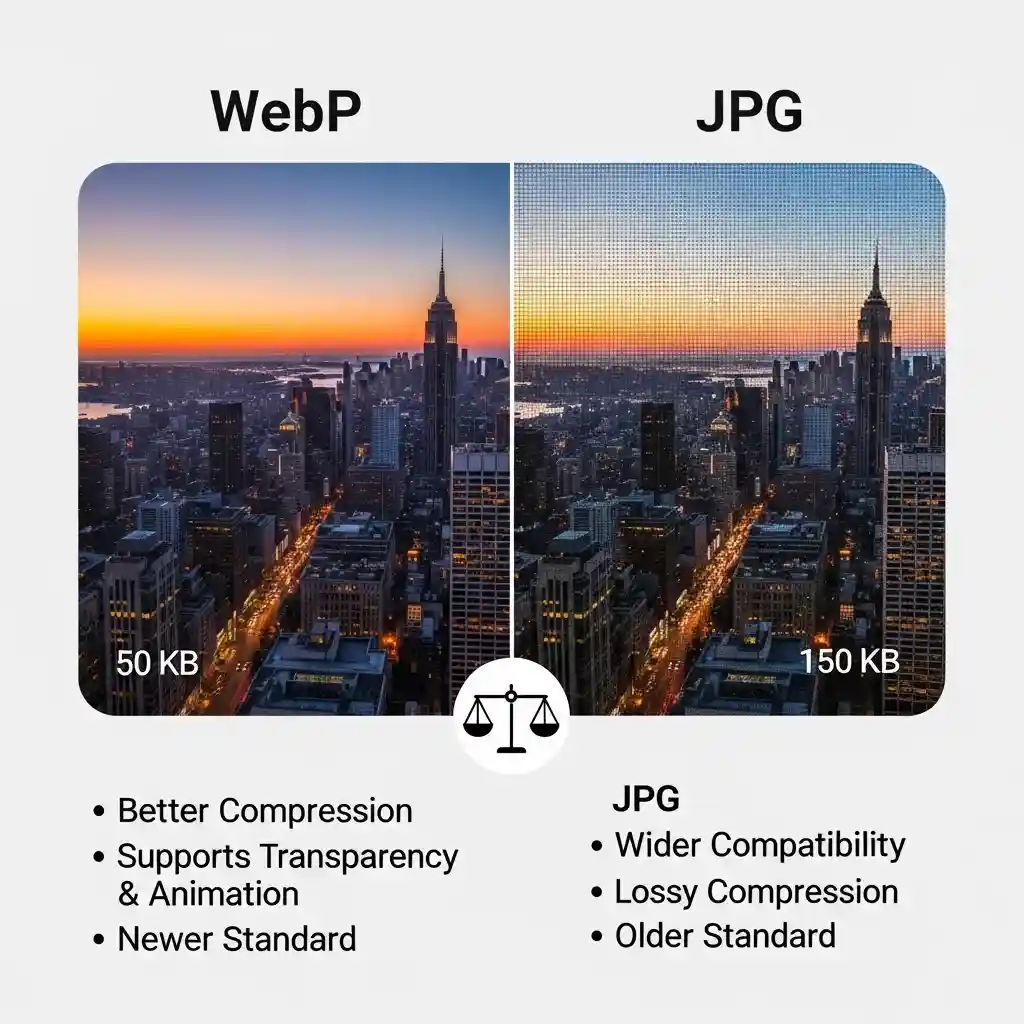
WebP vs JPG: Understanding the Difference (WebP vs JPEG Comparison)
When comparing <strong>webp vs jpg</strong> formats, it’s important to understand how these image types differ. Both <strong>webp vs jpeg</strong> comparisons show distinct advantages depending on your needs.
WebP (Web Picture Format)
- Superior compression (25-35% smaller files than JPG)
- Supports transparency (alpha channel)
- Better quality at same file size when compared in webp vs jpeg tests
- Growing browser support (90%+)
- Developed by Google (2010)
Use WebP when: You control the platform, target modern browsers, and want optimal compression with transparency support.
JPG (or JPEG – Joint Photographic Experts Group)
- Universal compatibility (100% support)
- Proven reliability since 1992
- Good compression with acceptable quality
- No transparency support
- Works on all devices and platforms
Use JPG when: You need guaranteed compatibility across all devices, browsers, and platforms, or when sharing with clients/public who may use older systems. This is why many users convert webp to .jpg for maximum compatibility.
Understanding webp vs jpg differences helps you decide when to batch convert webp to jpg for your specific needs.
WebP vs JPEG: When to Use Each Format
Choosing when to use our free conversion tool depends on your specific needs. Understanding these scenarios helps you decide when batch processing is most beneficial for your workflow.
When to Keep WebP Format:
Modern Web Applications:
WebP format excels for cutting-edge websites where browser compatibility is controlled and file size optimization is crucial.
High-Quality Requirements with Small Files:
Perfect when you need superior compression with transparency support for advanced graphics and illustrations.
When to Convert Multiple WebP Files to JPEG:
Universal Sharing and Compatibility:
Use our conversion platform for emails, social media, and platforms where WebP support might be limited.
Legacy System Support:
Transform multiple WebP files to JPEG format for older browsers, devices, and applications that don't support WebP.
Storage Optimization Projects
Batch WebP processing helps optimize file compatibility while maintaining reasonable file sizes for universal access.

Advanced Features of Our Bulk WebP to JPG Converter
Converting multiple WebP files individually is time-consuming. Our conversion platform offers advanced features designed specifically for efficient bulk processing with professional-quality output:
Upload Multiple Files with Our Bulk WebP to JPG Converter
Save time by dragging and dropping multiple files into our bulk webp to jpg converter.All images are processed together simultaneously without repeating steps, optimized for maximum efficiency.
One-Click Batch Conversion with Superior Quality
Instead of converting each WebP file separately, our online platform automatically processes every file in your batch into optimized JPEG format with a single click while maintaining exceptional quality.
Instant ZIP Download with Optimal Compression
Get all your converted JPEG images instantly through our bulk webp to jpg converter — perfect for managing large projects with optimal file size reduction.
Automatic Transparency Handling
Our conversion platform automatically handles WebP transparency by adding clean white backgrounds, ensuring professional JPEG results without transparency artifacts.
Built-in Image Compression for Web Optimization Benefits
Every WebP to JPEG transformation includes intelligent compression, giving you optimized file sizes for faster downloads, improved website performance, and better SEO rankings.
Automatic Transparency Removal During Conversion
WebP transparency is automatically handled during processing, ensuring clean JPEG backgrounds without manual editing required.
Conversion Tool Troubleshooting Guide
Handling Large File Sizes
When converting high-resolution WebP files, you might notice increased processing times. Our bulk webp to jpg converter automatically optimizes large files during transformation, but for files over 100MB, consider the file complexity as detailed graphics may require additional processing time.
Transparency Background Handling
WebP files with transparent backgrounds are automatically processed with white backgrounds during conversion to JPEG format. Our batch processing tool ensures clean, professional results without transparency artifacts that could affect image quality.
Batch Processing Optimization
When using our conversion platform for multiple files, upload similar-sized images together for more efficient processing. Mixed file sizes in batch conversion may result in varying processing times, though all conversions will complete successfully.
Complete Image Conversion Solutions
Our online conversion platform is part of a comprehensive suite of image processing tools designed for modern web workflows. Whether you’re working with transparency removal or static image optimization, these related tools complement your WebP conversion needs:
Graphics and Format Converters
Professional Image Optimization
Beyond format conversion, consider our image compression tools that work specifically with converted JPEG files. These tools help achieve the perfect balance between file size and visual quality while maintaining the crisp detail that WebP images are known for. Learn more about optimal JPEG compression techniques from Adobe's comprehensive image optimization guide
Batch Processing Solutions
For large-scale projects requiring WebP conversion, our batch processing capabilities integrate seamlessly with workflow automation tools, making it easy to convert hundreds of files while preserving image quality and removing transparency backgrounds consistently. For developers looking to understand the technical differences between WebP and JPEG formats, Mozilla's web media guide provides comprehensive format specifications and use case recommendations.
Technical Resources
For developers looking to understand the technical differences between WebP and JPG formats, Mozilla's web media guide provides comprehensive format specifications and use case recommendations. Additionally, Google's WebP developer documentation offers in-depth technical insights into WebP format capabilities and optimization techniques.
Frequently Asked Questions (FAQ)
Is this conversion tool completely free?
Yes, our bulk WebP to jpg converter is 100% free to use., There are no hidden charges, no watermarks, and no sign-up required.
What's the maximum file size limit?
You can upload large WebP files without worry. Our free conversion platform supports high-resolution images, and most files convert quickly regardless of size.
Do you store my uploaded images?
Yes. Our batch processing tool supports bulk conversion, allowing you to upload multiple files and download them all in one ZIP folder.
Will converting WebP to JPEG reduce image quality?
Converting WebP to JPEG may result in minimal quality changes because JPEG uses compression and doesn’t support transparency like WebP. However, our online conversion platform is designed to maintain the best possible balance between quality and file size, ensuring your images still look sharp while being optimized for universal compatibility.
What happens to WebP transparency when converting to JPEG?
Since JPEG format doesn’t support transparency, any transparent areas in your WebP images will be automatically filled with a white background during conversion. This ensures clean, professional-looking JPEG images without any transparency artifacts.
Is my data secure?
Absolutely. All image processing is done in real-time using our bulk webp to jpg converter, and your files are never stored or shared. Your privacy and data security are a top priority.
How to convert WebP to JPG?
To convert webp to jpg, simply upload your .webp files to our free online converter. Click “Choose File” or drag and drop your images, and they’ll automatically convert to .jpg format. You can then download them individually or as a ZIP file. Our tool works on Windows, Mac, and mobile devices without any software installation.
Can I batch convert WebP to JPG on Windows?
Yes! Our tool makes it easy to batch convert webp to jpg windows. Simply open your browser (Chrome, Edge, Firefox), upload multiple .webp files at once, and our converter processes them all simultaneously. You can download all converted .jpg files as a ZIP folder with one click.
What's the difference between WebP vs JPG?
When comparing webp vs jpg, the main differences are: WebP offers better compression (25-35% smaller files) and supports transparency, while JPG has universal compatibility across all devices and platforms. Many users convert webp to .jpg when they need guaranteed compatibility, even though WebP provides superior quality at smaller file sizes.
How do I bulk convert WebP to JPG?
To bulk convert webp to jpg, upload multiple .webp files to our converter at once. Our webp to jpg batch processing tool can handle hundreds of images simultaneously. All files are processed automatically, and you can download them together as a ZIP file or individually.
Can I convert .webp to .jpg without losing quality?
Yes! When you convert image from webp to jpg using our tool, we maintain the highest possible quality. While there may be minimal changes due to JPEG compression, our converter is optimized to preserve image quality while ensuring your .webp files are transformed to universally compatible .jpg format.
Convertidor de WebP a JPG (Español)
¿Cómo convertir WebP a JPG en español?
Nuestro convertidor de webp a jpg es completamente gratuito y fácil de usar. Simplemente sube tus archivos .webp y se convertirán automáticamente a formato .jpg.
¿Cómo pasar de WebP a JPG?
Para pasar de webp a jpg, sigue estos pasos:
- Arrastra y suelta tus imágenes WebP
- La conversión comienza automáticamente
- Descarga tus archivos JPG convertidos
Nuestro convertidor de webp a jpg funciona en cualquier dispositivo y navegador. Es rápido, seguro y sin marcas de agua.
English version: Use our free WebP to JPG converter above for instant conversion.
Looking for more conversion options?
Try our PNG to JPG converter or explore our complete bulk image converter suite.
After you convert webp to jpg, you can also compress JPG images to reduce file size further, or resize images for social media.